Showing posts with label Oracle DBA. Show all posts

22 July 2015

Database platform migration from Windows-64bit to Linux-64bit


Step by step oracle database platform migration from Windows-64bit to Linux-64bit :

To convert the database from one platform to another, the endian format of both databases should be the same.  So as a first step, check the v$transportable_platform view for both platforms.

SQL> select a.VERSION,a.INSTANCE_NAME,b.PLATFORM_NAME from v$instance a, v$database b;

VERSION           INSTANCE_NAME    PLATFORM_NAME
----------------- ---------------- --------------------------------

11.2.0.1.0        prod             Microsoft Windows x86 64-bit

SQL> select platform_name from v$db_transportable_platform;

PLATFORM_NAME
-------------------------------------
Microsoft Windows IA (32-bit)
Linux IA (32-bit)
HP Tru64 UNIX
Linux IA (64-bit)
HP Open VMS
Microsoft Windows IA (64-bit)
Linux x86 64-bit
Microsoft Windows x86 64-bit
Solaris Operating System (x86)
HP IA Open VMS
Solaris Operating System (x86-64)

11 rows selected.

It is seen from the output that both the Windows and Linux operating systems are in the little endian format.  So in this case, RMANcan be easily used to convert the whole database.

start database with mount stage and open database with the read only option
----------------------------------------------------------------------------

SQL> shut immediate
Database closed.
Database dismounted.
ORACLE instance shut down.
SQL> startup mount
ORACLE instance started.

Total System Global Area  855982080 bytes
Fixed Size                  2180544 bytes
Variable Size             515902016 bytes
Database Buffers          331350016 bytes
Redo Buffers                6549504 bytes
Database mounted.
SQL> alter database open read only;

Database altered.

Use dbms_tdb.check_db function to check whether the database can be transported to a target platform and the dbms_tdb.check_external function to check for existence of external objects, directories and BFILEs.  Pass the name of the destination platform as a parameter to the first function.  The return type of the function is boolean, so declare a variable with boolean type and call the function as follows:

SQL> set serveroutput on
SQL> declare
  2  v_return boolean;
  3  begin
  4  v_return:=dbms_tdb.check_db('Linux x86 64-bit');
  5  end;
  6  /

PL/SQL procedure successfully completed.

If nothing was returned, then it means that the database is ready to be transported to the destination platform.
----------------------------------------------------------------------------------------------------------------
Now call the second function dbms_tdb.check_external:

SQL> declare
  2  v_return boolean;
  3  begin
  4  v_return:=dbms_tdb.check_external;
  5  end;
  6  /
The following external tables exist in the database:
SH.SALES_TRANSACTIONS_EXT
The following directories exist in the database:
SYS.ORACLE_OCM_CONFIG_DIR, SYS.DATA_PUMP_DIR, SYS.XMLDIR, SYS.DATA_FILE_DIR,
SYS.LOG_FILE_DIR, SYS.MEDIA_DIR, SYS.SS_OE_XMLDIR, SYS.SUBDIR
The following BFILEs exist in the database:
PM.PRINT_MEDIA

PL/SQL procedure successfully completed.

SQL>

Run the convert database command to convert the whole database to the Linux platform.
------------------------------------------------------------------------------------

C:\Users\muthu>rman target /

Recovery Manager: Release 11.2.0.1.0 - Production on Tue Jul 21 18:40:46 2015

Copyright (c) 1982, 2009, Oracle and/or its affiliates.  All rights reserved.

connected to target database: PROD (DBID=297504150)

RMAN> convert database new database 'PRODNEW'
2> transport script 'c:\app\transport.sql'
3> db_file_name_convert 'C:\app\oradata\prod'
4> 'c:\app'
5> to platform 'Linux x86 64-bit';

Starting conversion at source at 21-JUL-15
using target database control file instead of recovery catalog
allocated channel: ORA_DISK_1
channel ORA_DISK_1: SID=14 device type=DISK

External table SH.SALES_TRANSACTIONS_EXT found in the database

Directory SYS.ORACLE_OCM_CONFIG_DIR found in the database
Directory SYS.DATA_PUMP_DIR found in the database
Directory SYS.XMLDIR found in the database
Directory SYS.DATA_FILE_DIR found in the database
Directory SYS.LOG_FILE_DIR found in the database
Directory SYS.MEDIA_DIR found in the database
Directory SYS.SS_OE_XMLDIR found in the database
Directory SYS.SUBDIR found in the database

BFILE PM.PRINT_MEDIA found in the database

User SYS with SYSDBA and SYSOPER privilege found in password file
channel ORA_DISK_1: starting datafile conversion
input datafile file number=00001 name=C:\APP\ORADATA\PROD\SYSTEM01.DBF
converted datafile=C:\APP\SYSTEM01.DBF
channel ORA_DISK_1: datafile conversion complete, elapsed time: 00:00:35
channel ORA_DISK_1: starting datafile conversion
input datafile file number=00002 name=C:\APP\ORADATA\PROD\SYSAUX01.DBF
converted datafile=C:\APP\SYSAUX01.DBF
channel ORA_DISK_1: datafile conversion complete, elapsed time: 00:00:25
channel ORA_DISK_1: starting datafile conversion
input datafile file number=00003 name=C:\APP\ORADATA\PROD\UNDOTBS01.DBF
converted datafile=C:\APP\UNDOTBS01.DBF
channel ORA_DISK_1: datafile conversion complete, elapsed time: 00:00:07
channel ORA_DISK_1: starting datafile conversion
input datafile file number=00005 name=C:\APP\ORADATA\PROD\EXAMPLE01.DBF
converted datafile=C:\APP\EXAMPLE01.DBF
channel ORA_DISK_1: datafile conversion complete, elapsed time: 00:00:07
channel ORA_DISK_1: starting datafile conversion
input datafile file number=00004 name=C:\APP\ORADATA\PROD\USERS01.DBF
converted datafile=C:\APP\USERS01.DBF
channel ORA_DISK_1: datafile conversion complete, elapsed time: 00:00:01
Edit init.ora file C:\APP\PRODUCT\11.2.0\DBHOME_1\DATABASE\INIT_00QCKDEH_1_0.ORA. This PFILE will be used to create the database on the
target platform
Run SQL script C:\APP\TRANSPORT.SQL on the target platform to create database
To recompile all PL/SQL modules, run utlirp.sql and utlrp.sql on the target platform
To change the internal database identifier, use DBNEWID Utility
Finished conversion at source at 21-JUL-15

RMAN> exit

While performing the convert database command, RMAN does not convert and transfer redo log files, controlfiles, password files and temporary tablespaces to the destination platform.

RMAN converted all datafiles to the destination platform type.  Now copy the parameter file transport.sql script, which is located at the $ORACLE_HOME/dbs directory, that is used to create the database and all datafiles to the destination host.

Perform the following prerequisite actions on the destination host before running the transport.sql.
----------------------------------------------------------------------------------------------------

[root@prodnew /]# mkdir oracle
[root@prodnew /]# chown -R oracle:oinstall oracle/
[root@prodnew /]# chmod -R 755 oracle/
[root@prodnew /]# su - oracle
[oracle@prodnew ~]$ mkdir -p /oracle/product/11.2.0/admin
[oracle@prodnew ~]$ mkdir -p /oracle/product/11.2.0/admin/adump
[oracle@prodnew ~]$ cd /oracle/product/11.2.0/dbs/
[oracle@prodnew ~]$ cp -r /oracle/*.DBF /oracle/product/oradata/

Move all datafiles to the necessary folder. Edit parameter file and convert paths from Windows syntax to the Linux syntax:
---------------------------------------------------------------------------------------------------------------------------
diagnostic_dest=/oracle/product/11.2.0/admin
control_files=("/oracle/product/oradata/control01.ctl", "/oracle/product/oradata/control02.ctl")
db_recovery_file_dest=/oracle/product/11.2.0
audit_file_dest=/oracle/product/11.2.0/admin/adump
local_listener=LISTENER_PROD

[oracle@prodnew dbs]$ vi initPRODNEW.ora  ----- Copy init file from Windows to linux then change the parameter
[oracle@prodnew dbs]$ cd ../network/admin/
[oracle@prodnew admin]$ vi listener.ora   ----  Copy listner file Windows to linux then change the parameter
[oracle@prodnew admin]$ vi tnsnames.ora   ----  Copy tnsname file Windows to linux then change the parameter
[oracle@prodnew admin]$ lsnrctl start

LSNRCTL for Linux: Version 11.2.0.1.0 - Production on 22-JUL-2015 00:20:35

Copyright (c) 1991, 2009, Oracle.  All rights reserved.

Starting /oracle/product/11.2.0/bin/tnslsnr: please wait...

TNSLSNR for Linux: Version 11.2.0.1.0 - Production
System parameter file is /oracle/product/11.2.0/network/admin/listener.ora
Log messages written to /oracle/product/11.2.0/admin/diag/tnslsnr/prodnew/listener/alert/log.xml
Listening on: (DESCRIPTION=(ADDRESS=(PROTOCOL=ipc)(KEY=EXTPROC1521)))
Listening on: (DESCRIPTION=(ADDRESS=(PROTOCOL=tcp)(HOST=prodnew.muthu.com)(PORT=1521)))

Connecting to (DESCRIPTION=(ADDRESS=(PROTOCOL=IPC)(KEY=EXTPROC1521)))
STATUS of the LISTENER
------------------------
Alias                     LISTENER
Version                   TNSLSNR for Linux: Version 11.2.0.1.0 - Production
Start Date                22-JUL-2015 00:20:36
Uptime                    0 days 0 hr. 0 min. 0 sec
Trace Level               off
Security                  ON: Local OS Authentication
SNMP                      OFF
Listener Parameter File   /oracle/product/11.2.0/network/admin/listener.ora
Listener Log File         /oracle/product/11.2.0/admin/diag/tnslsnr/prodnew/listener/alert/log.xml
Listening Endpoints Summary...
  (DESCRIPTION=(ADDRESS=(PROTOCOL=ipc)(KEY=EXTPROC1521)))
  (DESCRIPTION=(ADDRESS=(PROTOCOL=tcp)(HOST=prodnew.muthu.com)(PORT=1521)))
Services Summary...
Service "CLRExtProc" has 1 instance(s).
  Instance "CLRExtProc", status UNKNOWN, has 1 handler(s) for this service...
The command completed successfully
[oracle@prodnew admin]$ tnsping PRODNEW

TNS Ping Utility for Linux: Version 11.2.0.1.0 - Production on 22-JUL-2015 00:20:39

Copyright (c) 1997, 2009, Oracle.  All rights reserved.

Used parameter files:


Used TNSNAMES adapter to resolve the alias
Attempting to contact (DESCRIPTION = (ADDRESS = (PROTOCOL = TCP)(HOST = localhost)(PORT = 1521)) (CONNECT_DATA = (SERVER = DEDICATED) (SERVICE_NAME = PRODNEW.muthu.com)))
OK (50 msec)

Edit transport.sql script and correct paths of datafiles, controlfiles and trace directories.
---------------------------------------------------------------------------------------------

CREATE CONTROLFILE SET DATABASE "PRODNEW" RESETLOGS  NOARCHIVELOG
    MAXLOGFILES 16
    MAXLOGMEMBERS 3
    MAXDATAFILES 100
    MAXINSTANCES 8
    MAXLOGHISTORY 292
LOGFILE
  GROUP 1 '/oracle/product/oradata/REDO01.LOG'  SIZE 50M BLOCKSIZE 512,
  GROUP 2 '/oracle/product/oradata/REDO02.LOG'  SIZE 50M BLOCKSIZE 512,
  GROUP 3 '/oracle/product/oradata/REDO03.LOG'  SIZE 50M BLOCKSIZE 512
DATAFILE
  '/oracle/product/oradata/SYSTEM01.DBF',
  '/oracle/product/oradata/SYSAUX01.DBF',
  '/oracle/product/oradata/UNDOTBS01.DBF',
  '/oracle/product/oradata/USERS01.DBF',
  '/oracle/product/oradata/EXAMPLE01.DBF'
CHARACTER SET AL32UTF8
;

Now check all changes made above once more, export the ORACLE_SID environment variable and run the transport.sql command from SQL*Plus:
---------------------------------------------------------------------------------------------------------------------------------------

[oracle@prodnew dbs]$ export ORACLE_HOME=/oracle/product/11.2.0
[oracle@prodnew dbs]$ export ORACLE_SID=PRODNEW
[oracle@prodnew dbs]$ export PATH=/oracle/product/11.2.0/bin:$PATH
[oracle@prodnew dbs]$ sqlplus "/as sysdba"

SQL*Plus: Release 11.2.0.1.0 Production on Wed Jul 22 00:21:17 2015

Copyright (c) 1982, 2009, Oracle.  All rights reserved.

Connected to an idle instance.

SQL> startup nomount
ORACLE instance started.

Total System Global Area  855982080 bytes
Fixed Size                  2218152 bytes
Variable Size             503318360 bytes
Database Buffers          343932928 bytes
Redo Buffers                6512640 bytes
SQL> CREATE CONTROLFILE SET DATABASE "PRODNEW" RESETLOGS  NOARCHIVELOG
    MAXLOGFILES 16
  2    3      MAXLOGMEMBERS 3
  4      MAXDATAFILES 100
  5      MAXINSTANCES 8
  6      MAXLOGHISTORY 292
  7  LOGFILE
  GROUP 1 '/oracle/product/oradata/REDO01.LOG'  SIZE 50M BLOCKSIZE 512,
  8    9    GROUP 2 '/oracle/product/oradata/REDO02.LOG'  SIZE 50M BLOCKSIZE 512,
  GROUP 3 '/oracle/product/oradata/REDO03.LOG'  SIZE 50M BLOCKSIZE 512
 10   11  DATAFILE
 12    '/oracle/product/oradata/SYSTEM01.DBF',
 13    '/oracle/product/oradata/SYSAUX01.DBF',
 14    '/oracle/product/oradata/UNDOTBS01.DBF',
  '/oracle/product/oradata/USERS01.DBF',
 15   16    '/oracle/product/oradata/EXAMPLE01.DBF'
CHARACTER SET AL32UTF8
 17   18  ;

Control file created.

SQL> alter database open resetlogs;

Database altered.

SQL> ALTER TABLESPACE TEMP ADD TEMPFILE '/oracle/product/oradata/temp01.dbf' size 500M;

Tablespace altered.

SQL> shut immediate
Database closed.
Database dismounted.
ORACLE instance shut down.
SQL> startup upgrade
ORACLE instance started.

Total System Global Area  855982080 bytes
Fixed Size                  2218152 bytes
Variable Size             503318360 bytes
Database Buffers          343932928 bytes
Redo Buffers                6512640 bytes
Database mounted.
Database opened.
SQL> @@ ?/rdbms/admin/utlirp.sql

-- The following step will recompile all PL/SQL modules.
-- It may take serveral hours to complete.

DOC>#######################################################################
DOC>   utlirp.sql completed successfully. All PL/SQL objects in the
DOC>   database have been invalidated.
DOC>
DOC>   Shut down and restart the database in normal mode and run utlrp.sql to
DOC>   recompile invalid objects.
DOC>#######################################################################
DOC>#

SQL> shut immediate
Database closed.
Database dismounted.
ORACLE instance shut down.
SQL> startup
ORACLE instance started.

Total System Global Area  855982080 bytes
Fixed Size                  2218152 bytes
Variable Size             503318360 bytes
Database Buffers          343932928 bytes
Redo Buffers                6512640 bytes
Database mounted.
Database opened.
SQL> @ ?/rdbms/admin/utlrp.sql

SQL> select a.VERSION,a.INSTANCE_NAME,b.PLATFORM_NAME from v$instance a, v$database b;

VERSION           INSTANCE_NAME    PLATFORM_NAME
----------------- ---------------- -------------------
11.2.0.1.0        PRODNEW          Linux x86 64-bit

SQL>

20 July 2015

Step by Step Oracle Database 12c Release 1 (12.1.0.2) RAC On Oracle Linux 5.6 X64

Oracle Database 12c Release 1 (12.1.0.2) RAC On Oracle Linux 5.6 x86_64

This article describes the installation of Oracle Database 12c release 1 (12.1.0.2 64-bit) RAC on Linux (Oracle Linux 5.6 64-bit)
RAC and Oracle Clusterware Best Practices and Starter Kit (Platform Independent) (Doc ID 810394.1)
Steps To Shutdown(stop)/Startup(start) CRS, OHAS, ASM, RDBMS & ACFS Services on a RAC Cluster 11.2 & 12.1 Configuration (Doc ID 1355977.1)

How To Setup ASM (11.2 & 12.1) On An Active/Passive Cluster (Non-RAC). (Doc ID 1296124.1)

Grid Infrastructure and RAC Installation, Upgrade, and Patching (Doc ID 1998696.1)

###################Node1 #############################
[oracle@rac1 .ssh]$ cat /etc/hosts
# Do not remove the following line, or various programs
# that require network functionality will fail.
127.0.0.1       localhost.localdomain localhost
::1             localhost6.localdomain6 localhost6

############### Public IP ADDRESS#########
192.168.110.128 rac1.test.com   rac1
192.168.110.130 rac2.test.com   rac2
#############Prive IP ADDRESS#############
192.168.88.15 rac1-priv.test.com      rac1-priv
192.168.88.16 rac2-priv.test.com      rac2-priv
###############VIP #######################
192.168.110.131  rac2-vip.test.com       rac2-vip
192.168.110.129 rac1-vip.test.com       rac1-vip
192.168.88.17   openfiler.test.com      openfiler
192.168.110.132                rac-scan
192.168.110.133                rac-scan
192.168.110.134                rac-scan
#########################NODE-2#######################
[oracle@rac2 .ssh]$ cat /etc/hosts
# Do not remove the following line, or various programs
# that require network functionality will fail.
127.0.0.1       localhost.localdomain localhost
::1             localhost6.localdomain6 localhost6
############### Public IP ADDRESS#########
192.168.110.128 rac1.test.com   rac1
192.168.110.130 rac2.test.com   rac2
#############Prive IP ADDRESS#############
192.168.88.15 rac1-priv.test.com      rac1-priv
192.168.88.16 rac2-priv.test.com      rac2-priv
###############VIP #######################
192.168.110.131  rac2-vip.test.com       rac2-vip
192.168.110.129 rac1-vip.test.com       rac1-vip
192.168.88.17   openfiler.test.com      openfiler
192.168.110.132                rac-scan
192.168.110.133                rac-scan
192.168.110.134                rac-scan

##############################NODE -1 ##################
[root@rac1 iscsi]# mkdir -p /u01/app/12.1.0.2/grid
 [root@rac1 iscsi]# mkdir -p /u01/app/oracle/product/12.1.0.2/db_1
 [root@rac1 iscsi]# chown -R oracle:dba /u01
 [root@rac1 iscsi]# chmod -R 775 /u01/app/oracle
[root@rac1 iscsi]# chmod -R 775 /u01
Add following line for user oracle to set shell limits in file /etc/security/limits.conf
[root@rac1 iscsi]# vi /etc/security/limits.conf
# shell limits for users oracle 12.1.0.2
oracle   soft   nofile   1024
oracle   hard   nofile   65536
oracle   soft   nproc    2047
oracle   hard   nproc    16384
oracle   soft   stack    10240
oracle   hard   stack    32768

########################NODE-2 #########################
Create the directories in which the Oracle software will be installed.

[root@rac2 ~]# mkdir -p  /u01/app/12.1.0.2/grid
[root@rac2 ~]# mkdir -p /u01/app/oracle/product/12.1.0.2/db_1
[root@rac2 ~]# chown -R oracle:oinstall /u01
[root@rac2 ~]# chmod -R 775 /u01/
Add following line for user oracle to set shell limits in file /etc/security/limits.conf
[root@rac2]# vi /etc/security/limits.conf
# shell limits for users oracle 12.1.0.2

oracle   soft   nofile   1024
oracle   hard   nofile   65536
oracle   soft   nproc    2047
oracle   hard   nproc    16384
oracle   soft   stack    10240
oracle   hard   stack    32768

Oracle Installation Prerequisites

yum install oracle-rdbms-server-12cR1-preinstall -y

Manual Setup

If you have not installed oracle-rdbms-server-12cR1-preinstall package, you need to manually perform the following setup tasks.
########################NODE-1 #########################
Add or amend the following lines to the "/etc/sysctl.conf" file.

fs.file-max = 6815744
kernel.sem = 250 32000 100 128
kernel.shmmni = 4096
kernel.shmall = 1073741824
kernel.shmmax = 4398046511104
net.core.rmem_default = 262144
net.core.rmem_max = 4194304
net.core.wmem_default = 262144
net.core.wmem_max = 1048576
fs.aio-max-nr = 1048576
net.ipv4.ip_local_port_range = 9000 65500

Apply kernel parameters
 [root@rac1 ~]# sysctl -p


Create the new groups and users.

[root@rac1 ~]# groupadd -g 54321 oinstall
[root@rac1 ~]# groupadd -g 54322 dba
[root@rac1 ~]# groupadd -g 54323 oper
[root@rac1 ~]# #groupadd -g 54324 backupdba
[root@rac1 ~]# #groupadd -g 54325 dgdba
[root@rac1 ~]# #groupadd -g 54326 kmdba
[root@rac1 ~]# #groupadd -g 54327 asmdba
[root@rac1 ~]# #groupadd -g 54328 asmoper
[root@rac1 ~]# #groupadd -g 54329 asmadmin

########################NODE-2 #########################
Add or amend the following lines to the "/etc/sysctl.conf" file.

fs.file-max = 6815744
kernel.sem = 250 32000 100 128
kernel.shmmni = 4096
kernel.shmall = 1073741824
kernel.shmmax = 4398046511104
net.core.rmem_default = 262144
net.core.rmem_max = 4194304
net.core.wmem_default = 262144
net.core.wmem_max = 1048576
fs.aio-max-nr = 1048576
net.ipv4.ip_local_port_range = 9000 65500

Apply kernel parameters
[root@rac2 ~]# sysctl -p

Create the new groups and users.

[root@rac2 ~]# groupadd -g 54321 oinstall
[root@rac2 ~]# groupadd -g 54322 dba
[root@rac2 ~]# groupadd -g 54323 oper
[root@rac2 ~]# #groupadd -g 54324 backupdba
[root@rac2 ~]# #groupadd -g 54325 dgdba
[root@rac2 ~]# #groupadd -g 54326 kmdba
[root@rac2 ~]# #groupadd -g 54327 asmdba
[root@rac2 ~]# #groupadd -g 54328 asmoper
[root@rac1 ~]# #groupadd -g 54329 asmadmin

########################NODE-1 #########################
To configure ASMlib first you need to download ASMLib rpms

[root@rac1 oracle]# oracleasm configure -i
Configuring the Oracle ASM library driver.

This will configure the on-boot properties of the Oracle ASM library
driver.  The following questions will determine whether the driver is
loaded on boot and what permissions it will have.  The current values
will be shown in brackets ('[]').  Hitting <ENTER> without typing an
answer will keep that current value.  Ctrl-C will abort.

Default user to own the driver interface [oracle]: ----Enter grid user name
Default group to own the driver interface [dba]:  ----Enter grid group name
Start Oracle ASM library driver on boot (y/n) [n]: y
Scan for Oracle ASM disks on boot (y/n) [y]:
Writing Oracle ASM library driver configuration: done

[root@rac1 oracle]# oracleasm init
Creating /dev/oracleasm mount point: /dev/oracleasm
Loading module "oracleasm": oracleasm
Mounting ASMlib driver filesystem: /dev/oracleasm

Create RAW disk:

[root@rac1 oracle]# fdisk /dev/sdb
Device contains neither a valid DOS partition table, nor Sun, SGI or OSF disklabel
Building a new DOS disklabel. Changes will remain in memory only,
until you decide to write them. After that, of course, the previous
content won't be recoverable.

The number of cylinders for this disk is set to 57248.
There is nothing wrong with that, but this is larger than 1024,
and could in certain setups cause problems with:
1) software that runs at boot time (e.g., old versions of LILO)
2) booting and partitioning software from other OSs
   (e.g., DOS FDISK, OS/2 FDISK)
Warning: invalid flag 0x0000 of partition table 4 will be corrected by w(rite)

Command (m for help): n
Command action
   e   extended
   p   primary partition (1-4)
p
Partition number (1-4): 1
First cylinder (1-57248, default 1):
Using default value 1
Last cylinder or +size or +sizeM or +sizeK (1-57248, default 57248):
Using default value 57248

Command (m for help): wq
The partition table has been altered!

Calling ioctl() to re-read partition table.

WARNING: Re-reading the partition table failed with error 16: Device or resource busy.
The kernel still uses the old table.
The new table will be used at the next reboot.
Syncing disks.
[root@rac1 oracle]# fdisk /dev/sdc
Device contains neither a valid DOS partition table, nor Sun, SGI or OSF disklabel
Building a new DOS disklabel. Changes will remain in memory only,
until you decide to write them. After that, of course, the previous
content won't be recoverable.

Warning: invalid flag 0x0000 of partition table 4 will be corrected by w(rite)

Command (m for help): n
Command action
   e   extended
   p   primary partition (1-4)
p
Partition number (1-4): 1
First cylinder (1-1009, default 1):
Using default value 1
Last cylinder or +size or +sizeM or +sizeK (1-1009, default 1009):
Using default value 1009

Command (m for help): wq
The partition table has been altered!

Calling ioctl() to re-read partition table.

WARNING: Re-reading the partition table failed with error 16: Device or resource busy.
The kernel still uses the old table.
The new table will be used at the next reboot.
Syncing disks.
[root@rac1 oracle]# fdisk /dev/sdd
Device contains neither a valid DOS partition table, nor Sun, SGI or OSF disklabel
Building a new DOS disklabel. Changes will remain in memory only,
until you decide to write them. After that, of course, the previous
content won't be recoverable.

Warning: invalid flag 0x0000 of partition table 4 will be corrected by w(rite)

Command (m for help): n
Command action
   e   extended
   p   primary partition (1-4)
p
Partition number (1-4): 1
First cylinder (1-1009, default 1):
Using default value 1
Last cylinder or +size or +sizeM or +sizeK (1-1009, default 1009):
Using default value 1009

Command (m for help): wq
The partition table has been altered!

Calling ioctl() to re-read partition table.

WARNING: Re-reading the partition table failed with error 16: Device or resource busy.
The kernel still uses the old table.
The new table will be used at the next reboot.
Syncing disks.
[root@rac1 oracle]# fdisk -l

Disk /dev/sda: 26.8 GB, 26843545600 bytes
255 heads, 63 sectors/track, 3263 cylinders
Units = cylinders of 16065 * 512 = 8225280 bytes

   Device Boot      Start         End      Blocks   Id  System
/dev/sda1   *           1          13      104391   83  Linux
/dev/sda2              14        3002    24009142+  83  Linux
/dev/sda3            3003        3263     2096482+  82  Linux swap / Solaris

Disk /dev/sdb: 60.0 GB, 60028878848 bytes
64 heads, 32 sectors/track, 57248 cylinders
Units = cylinders of 2048 * 512 = 1048576 bytes

   Device Boot      Start         End      Blocks   Id  System
/dev/sdb1               1       57248    58621936   83  Linux

Disk /dev/sdc: 2147 MB, 2147483648 bytes
67 heads, 62 sectors/track, 1009 cylinders
Units = cylinders of 4154 * 512 = 2126848 bytes

   Device Boot      Start         End      Blocks   Id  System
/dev/sdc1               1        1009     2095662   83  Linux

Disk /dev/sdd: 2147 MB, 2147483648 bytes
67 heads, 62 sectors/track, 1009 cylinders
Units = cylinders of 4154 * 512 = 2126848 bytes

   Device Boot      Start         End      Blocks   Id  System
/dev/sdd1               1        1009     2095662   83  Linux
[root@rac1 oracle]# oracleasm createdisk DISK1 /dev/sdb1
Writing disk header: done
Instantiating disk: done
[root@rac1 oracle]# oracleasm createdisk DISK2 /dev/sdc
sdc   sdc1
[root@rac1 oracle]# oracleasm createdisk DISK2 /dev/sdc
sdc   sdc1
[root@rac1 oracle]# oracleasm createdisk DISK2 /dev/sdc1
Writing disk header: done
Instantiating disk: done
[root@rac1 oracle]# oracleasm createdisk DISK3 /dev/sdd1
Writing disk header: done
Instantiating disk: done
[root@rac1 oracle]# oracleasm listdisks
DISK1
DISK2
DISK3
########################NODE-2 #########################
[root@rac2 ]# oracleasm listdisks
DISK1
DISK2
DISK3

########################NODE-1 #########################

Configure dnsmasq for SCAN  ----  Node 1 Configuration

create new file “/etc/racdns” with settings for SCAN

192.168.110.132 rac-scan.test.com       rac-scan
192.168.110.133 rac-scan.test.com       rac-scan
192.168.110.134 rac-scan.test.com       rac-scan

[root@rac1 oracle]# service named stop
[root@rac1 oracle]# cat /etc/dnsmasq.conf | grep addn-hosts
#addn-hosts=/etc/banner_add_hosts
[root@rac1 oracle]# vi /etc/dnsmasq.conf  -   Add below parameter
addn-hosts=/etc/racdns
[root@rac1 oracle]# service dnsmasq start
Starting dnsmasq:                                          [  OK  ]
[root@rac1 oracle]# chkconfig named off
[root@rac1 oracle]# chkconfig dnsmasq on

As default dnsmasq is running on ip adress 127.0.0.1 so it requires following settings in “/etc/resolv.conf”.

[root@rac1 oracle]# cat /etc/resolv.conf
; generated by /sbin/dhclient-script
search test.com
nameserver 192.168.1.1
nameserver 127.0.0.1

Verification of DNS

[root@rac1 oracle]# nslookup rac-scan
Server:         127.0.0.1
Address:        127.0.0.1#53

Name:   rac-scan.test.com
Address: 192.168.110.132
Name:   rac-scan.test.com
Address: 192.168.110.133
Name:   rac-scan.test.com
Address: 192.168.110.134

Repeat the same DNS setup for node 2 also

[root@rac2 ~]# nslookup rac-scan
Server:         127.0.0.1
Address:        127.0.0.1#53

Name:   rac-scan.test.com
Address: 192.168.110.134
Name:   rac-scan.test.com
Address: 192.168.110.132
Name:   rac-scan.test.com
Address: 192.168.110.133

Verify network between nodes
########################NODE-1 #########################
[root@rac1 oracle]# hostname
rac1.test.com
You have new mail in /var/spool/mail/root
[root@rac1 oracle]# ping rac1 -c 1
PING rac1.test.com (192.168.110.128) 56(84) bytes of data.
64 bytes from rac1.test.com (192.168.110.128): icmp_seq=1 ttl=64 time=0.044 ms

--- rac1.test.com ping statistics ---
1 packets transmitted, 1 received, 0% packet loss, time 0ms
rtt min/avg/max/mdev = 0.044/0.044/0.044/0.000 ms
[root@rac1 oracle]# ping rac2 -c 1
PING rac2.test.com (192.168.110.130) 56(84) bytes of data.
64 bytes from rac2.test.com (192.168.110.130): icmp_seq=1 ttl=64 time=0.955 ms

--- rac2.test.com ping statistics ---
1 packets transmitted, 1 received, 0% packet loss, time 0ms
rtt min/avg/max/mdev = 0.955/0.955/0.955/0.000 ms
[root@rac1 oracle]# ping rac1-priv -c 1
PING rac1-priv.test.com (192.168.88.15) 56(84) bytes of data.
64 bytes from rac1-priv.test.com (192.168.88.15): icmp_seq=1 ttl=64 time=0.042 ms

--- rac1-priv.test.com ping statistics ---
1 packets transmitted, 1 received, 0% packet loss, time 0ms
rtt min/avg/max/mdev = 0.042/0.042/0.042/0.000 ms
[root@rac1 oracle]# ping rac2-priv -c 1
PING rac2-priv.test.com (192.168.88.16) 56(84) bytes of data.
64 bytes from rac2-priv.test.com (192.168.88.16): icmp_seq=1 ttl=64 time=0.268 ms

--- rac2-priv.test.com ping statistics ---
1 packets transmitted, 1 received, 0% packet loss, time 0ms
rtt min/avg/max/mdev = 0.268/0.268/0.268/0.000 ms
[root@rac1 oracle]#
########################NODE-2 #########################

[root@rac2 ~]# hostname
rac2.test.com
You have new mail in /var/spool/mail/root
[root@rac2 ~]# ping rac1 -c 1
PING rac1.test.com (192.168.110.128) 56(84) bytes of data.
64 bytes from rac1.test.com (192.168.110.128): icmp_seq=1 ttl=64 time=1.98 ms

--- rac1.test.com ping statistics ---
1 packets transmitted, 1 received, 0% packet loss, time 0ms
rtt min/avg/max/mdev = 1.981/1.981/1.981/0.000 ms
[root@rac2 ~]# ping rac2 -c 1
PING rac2.test.com (192.168.110.130) 56(84) bytes of data.
64 bytes from rac2.test.com (192.168.110.130): icmp_seq=1 ttl=64 time=0.022 ms

--- rac2.test.com ping statistics ---
1 packets transmitted, 1 received, 0% packet loss, time 0ms
rtt min/avg/max/mdev = 0.022/0.022/0.022/0.000 ms
[root@rac2 ~]# ping rac1-priv -c 1
PING rac1-priv.test.com (192.168.88.15) 56(84) bytes of data.
64 bytes from rac1-priv.test.com (192.168.88.15): icmp_seq=1 ttl=64 time=2.89 ms

--- rac1-priv.test.com ping statistics ---
1 packets transmitted, 1 received, 0% packet loss, time 0ms
rtt min/avg/max/mdev = 2.899/2.899/2.899/0.000 ms
[root@rac2 ~]# ping rac2-priv -c 1
PING rac2-priv.test.com (192.168.88.16) 56(84) bytes of data.
64 bytes from rac2-priv.test.com (192.168.88.16): icmp_seq=1 ttl=64 time=0.019 ms

--- rac2-priv.test.com ping statistics ---
1 packets transmitted, 1 received, 0% packet loss, time 0ms
rtt min/avg/max/mdev = 0.019/0.019/0.019/0.000 ms
[root@rac2 ~]#

Oracle is using for automatic memory management Linux shared segemnts. Usually they are too small but you can modify it on-the-fly. For this presentation we need 2500M.
Just modify entry in “/etc/fstab” to have persistent settings between reboot of your machine
tmpfs   /dev/shm   tmpfs  default,size=2G  0 0
remount it
mount -o remount tmpfs
 
Repeat the steps for Node -2
 
Change NTP
NTP modify “/etc/sysconfig/ntpd” file to
OPTIONS="-x -u ntp:ntp -p /var/run/ntpd.pid"
and restart NTP
# service ntpd restart
 
Repeat the steps for Node -2 also

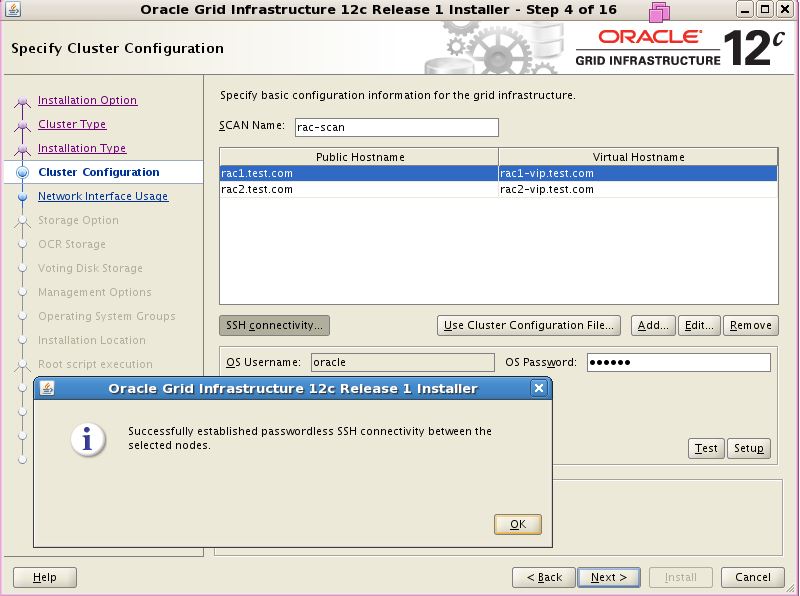
Start grid software installation as user oracle, remember to run command xhost+ as root.

Install package cvuqdisk-1.0.9-1.rpm from grid software as user root


Check Cluster status on Node 1 and Node 2

[root@rac1 ~]# crsctl stat res -t
--------------------------------------------------------------------------------
Name           Target  State        Server                   State details
--------------------------------------------------------------------------------
Local Resources
--------------------------------------------------------------------------------
ora.LISTENER.lsnr
               ONLINE  ONLINE       rac1                     STABLE
               ONLINE  ONLINE       rac2                     STABLE
ora.PROD.dg
               ONLINE  ONLINE       rac1                     STABLE
               ONLINE  ONLINE       rac2                     STABLE
ora.asm
               ONLINE  ONLINE       rac1                     Started,STABLE
               ONLINE  ONLINE       rac2                     Started,STABLE
ora.net1.network
               ONLINE  ONLINE       rac1                     STABLE
               ONLINE  ONLINE       rac2                     STABLE
ora.ons
               ONLINE  ONLINE       rac1                     STABLE
               ONLINE  ONLINE       rac2                     STABLE
--------------------------------------------------------------------------------
Cluster Resources
--------------------------------------------------------------------------------
ora.LISTENER_SCAN1.lsnr
      1        ONLINE  ONLINE       rac1                     STABLE
ora.LISTENER_SCAN2.lsnr
      1        ONLINE  ONLINE       rac1                     STABLE
ora.LISTENER_SCAN3.lsnr
      1        ONLINE  ONLINE       rac1                     STABLE
ora.MGMTLSNR
      1        OFFLINE OFFLINE                               STABLE
ora.cvu
      1        ONLINE  ONLINE       rac1                     STABLE
ora.oc4j
      1        ONLINE  ONLINE       rac1                     STABLE
ora.prod.db
      1        ONLINE  ONLINE       rac1                     Open,STABLE
      2        ONLINE  ONLINE       rac2                     Open,STABLE
ora.rac1.vip
      1        ONLINE  ONLINE       rac1                     STABLE
ora.rac2.vip
      1        ONLINE  ONLINE       rac2                     STABLE
ora.scan1.vip
      1        ONLINE  ONLINE       rac1                     STABLE
ora.scan2.vip
      1        ONLINE  ONLINE       rac1                     STABLE
ora.scan3.vip
      1        ONLINE  ONLINE       rac1                     STABLE

Install 12.1.0.2 oracle database:


[root@rac1 ~]#sqlplus "/as sysdba"

SQL*Plus: Release 12.1.0.2.0 Production on Sat Jul 18 17:40:30 2015

Copyright (c) 1982, 2014, Oracle.  All rights reserved.

Connected to:
Oracle Database 12c Enterprise Edition Release 12.1.0.2.0 - 64bit Production
With the Partitioning, Real Application Clusters, Automatic Storage Management, OLAP,
Advanced Analytics and Real Application Testing options

SQL> select INSTANCE_NUMBER,INSTANCE_NAME,HOST_NAME,VERSION from gv$instance;

INSTANCE_NUMBER INSTANCE_NAME    HOST_NAME            VERSION
--------------- ---------------- -------------------- -----------------
              1 prod1            rac1.test.com        12.1.0.2.0
              2 prod2            rac2.test.com        12.1.0.2.0