Showing posts with label Oracle Apps. Show all posts

13 December 2017

Cannot identify any valid application tier nodes in ADOP_VALID_NODES table. Ensure AutoConfig has been run on all nodes

$ adop phase=apply patchtop=/web02/Patch/R122_Pre/APPS/R12.2.7 patches=25820806,25828573 hotpatch=yes merge=yes

Enter the APPS password:
Enter the SYSTEM password:
Enter the WLSADMIN password:

Validating credentials.

Initializing.
    Run Edition context  : /web03/TEST/fs1/inst/apps/TEST_epswdev/appl/admin/TEST_epswdev.xml
    Patch edition context: /web03/TEST/fs2/inst/apps/TEST_epswdev/appl/admin/TEST_epswdev.xml
*******FATAL ERROR*******
PROGRAM : (/web03/TEST/fs1/EBSapps/appl/ad/12.0.0/bin/adzdoptl.pl)
TIME    : Fri Dec 08 12:01:32 2017
FUNCTION: ADOP::GlobalVars::_GetMandatoryArgs [ Level 1 ]
ERRORMSG: Cannot identify any valid application tier nodes in
          ADOP_VALID_NODES table. Ensure AutoConfig has been run on all nodes.


[STATEMENT] Please run adopscanlog utility, using the command

"adopscanlog -latest=yes"

to get the list of the log files along with snippet of the error message corresponding to each log file.


adop exiting with status = 9 (Fail)

sqlplus apps/apps EXEC FND_CONC_CLONE.SETUP_CLEAN;
COMMIT;

Run autoconfig on DB and application node including Patch FS.

Restart the adop

adop phase=apply patchtop=/web02/Patch/R122_Pre/APPS/R12.2.7 patches=25820806,25828573 hotpatch=yes merge=yes restart=yes abandon=no

Still Issue Persist Folow Slution 2 below.

Solution 2:

select * from FND_OAM_CONTEXT_FILES;

select APPL_TOP_ID,NAME from ad_appl_tops;

select * from fnd_nodes

drop synonym apps.fnd_nodes;

create synonym apps.fnd_nodes for applsys.fnd_nodes;

drop synonym apps.fnd_oam_context_files;

create synonym apps.fnd_oam_context_files for applsys.fnd_oam_context_files;

Restart the adop

adop phase=apply patchtop=/web02/Patch/R122_Pre/APPS/R12.2.7 patches=25820806,25828573 hotpatch=yes merge=yes restart=yes abandon=no

[ERROR]: The values of s_current_base and s_other_base are not set correctly on both RUN and PATCH filesystems

adop phase=apply patchtop=$AU_TOP/patch/115 patches=driver:u10201000.drv options=nocopyportion,nogenerateportion,forceapply hotpatch=yes

When attempting to run adop phase=prepare, the following error occurs.

[ERROR]: JDK TOP (or FMW JDK TOP) is not set up correctly.
[WARNING]: There could be issues while validating the ports used for E-Business Suite instance against ports used in /etc/services. Refer the log file for more details.
[ERROR]: Some of the ports specified for the patch file system are not available.
[ERROR]: The value of s_file_edition is not set correctly in at least one of the context files
[ERROR]: The values of s_current_base and s_other_base are not set correctly on both RUN and PATCH filesystems

Solution:-

 Delete duplicate context files and run autoconfig to create new ones.

 1.backup FND_OAM_CONTEXT_FILES

 SQL>create table FND_OAM_CONTEXT_FILES_BK as select * from FND_OAM_CONTEXT_FILES;

 2.delete data from FND_OAM_CONTEXT_FILES table.

 SQL>delete from FND_OAM_CONTEXT_FILES;

 3.run autoconfig on all nodes including Patch FS.

 4.confirm the new data from FND_OAM_CONTEXT_FILES;

 SQL>select * from FND_OAM_CONTEXT_FILES;

 5.execute the adop again.

 Alternate solution2 :

 SQL> EXEC FND_CONC_CLONE.SETUP_CLEAN;

 SQL> Commit;

 run autoconfig on all nodes including Patch FS.

 confirm the new data from FND_OAM_CONTEXT_FILES;

 SQL>select * from FND_OAM_CONTEXT_FILES;

 execute the adop again.

Step by Step R12.2 Custom Top registration

Download Configuration files from brlow patch 3636980

copy three .txt files from the patch 3636980\izu\admin directory to your own temp location

Rename izuterr.txt to CUSTOM_TOPterr.txt
Rename izuprod.txt to CUSTOM_TOPprod.txt

vi newprods.txt

%%% Splicer control file format 12.0.A
#
# $Header: newprods.txt 120.1 2006/09/20 12:57:45 jaobrien noship $
#
#
# Section for Oracle Support Diagnostic Tools

product=xbol
base_product_top=*APPL_TOP*
oracle_schema=xbol #-  Change Your Customtop Name
sizing_factor=100
main_tspace=XBOL   #-  Change your Tablespace name
index_tspace=XBOL   #-  Change your Index Tablespace name
temp_tspace=TEMP
default_tspace=XBOL   #-  Change your default Tablespace name

vi CUSTOM_TOPterr.txt to change izu to CUSTOM_TOP

Linux  : %s/izu/CUSTOM_TOP/g -  press enter

:%s/IZU/CUSTOM_TOP/g -  press enter then save and Quit

vi izuprod.txt change the izu to CUSTOM_TOP

Copy three text file from temp location to appl_top location

cp *.txt $APPL_TOP/admin

Then run adsplice to register custom top

$ adsplice

                     Copyright (c) 2002, 2012 Oracle Corporation
                        Redwood Shores, California, USA

                                   AD Splicer

                                 Version 12.2.0

NOTE: You may not use this utility for custom development
      unless you have written permission from Oracle Corporation.

Your default directory is '/web03/TEST/fs1/EBSapps/appl'.
Is this the correct APPL_TOP [Yes] ?

AD Splicer records your AD Splicer session in a text file
you specify.  Enter your AD Splicer log file name or press [Return]
to accept the default file name shown in brackets.

Filename [adsplice.log] :

************* Start of AD Splicer session *************
AD Splicer version: 12.2.0
AD Splicer started at: Mon Dec 11 2017 11:08:31

APPL_TOP is set to /web03/TEST/fs1/EBSapps/appl

Change DB = YES.


Backing up restart files, if any......Done.


Your previous AD Splicer session did not run to completion.
Do you wish to continue with your previous AD Splicer session [Yes] ? no

You chose to disregard your previous AD Splicer session
and to restart AD Splicer from the beginning.

Enter Yes to confirm that you wish to overwrite your previous
AD Splicer session and begin a new AD Splicer session.

Enter No to continue with your previous AD Splicer session. [No] : yes


Please enter the name of the Oracle E-Business Suite System that this
APPL_TOP belongs to.

The Applications System name must be unique across all Oracle
Applications Systems at your site, must be from 1 to 30 characters
long, may only contain alphanumeric and underscore characters,
and must start with a letter.

Sample Applications System names are: "prod", "test", "demo" and
"Development_2".

Applications System Name [TEST] : TEST *


NOTE: If you do not currently have certain types of files installed
in this APPL_TOP, you may not be able to perform certain tasks.

Example 1: If you don't have files used for installing or upgrading
the database installed in this area, you cannot install or upgrade
the database from this APPL_TOP.

Example 2: If you don't have forms files installed in this area, you cannot
generate them or run them from this APPL_TOP.

Example 3: If you don't have concurrent program files installed in this area,
you cannot relink concurrent programs or generate reports from this APPL_TOP.


Do you currently have or want to install files  used for installing or upgrading
the database in this APPL_TOP [YES] ? YES *


Do you currently have or want to install Java and HTML files for HTML-based
functionality in this APPL_TOP [YES] ? YES *


Do you currently have or want to install Oracle E-Business Suite forms files
in this APPL_TOP [YES] ? YES *


Do you currently have or want to install concurrent program files
in this APPL_TOP [YES] ? YES *


Please enter the name Oracle E-Business Suite will use to identify this APPL_TOP.

The APPL_TOP name you select must be unique within an Oracle E-Business Suite
System, must be from 1 to 30 characters long, may only contain
alphanumeric and underscore characters, and must start with a letter.

Sample APPL_TOP Names are: "prod_all", "demo3_forms2", and "forms1".

APPL_TOP Name [AT_epswdev] : AT_epswdev *


You are about to install or upgrade Oracle E-Business Suite product tables
in your ORACLE database 'TEST'
using ORACLE executables in '/web03/TEST/fs1/EBSapps/10.1.2'.

Is this the correct database [Yes] ?

AD Splicer needs the password for your 'SYSTEM' ORACLE schema
in order to determine your installation configuration.

Enter the password for your 'SYSTEM' ORACLE schema:


The ORACLE username specified below for Application Object Library
uniquely identifies your existing product group: APPLSYS

Enter the ORACLE password of Application Object Library [APPS] :

AD Splicer is verifying your username/password.

The status of various features in this run of AD Splicer is:

                                           <-Feature version in->
Feature                          Active?   APPLTOP    Data model    Flags
------------------------------   -------   --------   -----------   -----------
CHECKFILE                        Yes       1          1             Y N N Y N Y
PREREQ                           Yes       6          6             Y N N Y N Y
CONCURRENT_SESSIONS              No        2          2             Y Y N Y Y N
PATCH_TIMING                     Yes       2          2             Y N N Y N Y
PATCH_HIST_IN_DB                 Yes       6          6             Y N N Y N Y
SCHEMA_SWAP                      Yes       1          1             Y N N Y Y Y
JAVA_WORKER                      Yes       1          1             Y N N Y N Y
CODELEVEL                        Yes       1          1             Y N N Y N Y


Reading product information from file...

Reading language and territory information from file...

Reading language information from applUS.txt ...

Reading database to see what industry is currently installed.

Reading FND_LANGUAGES to see what is currently installed.
Currently, the following language is installed:

Code   Language                                Status
----   --------------------------------------- ---------
US     American English                        Base

Your base language will be AMERICAN.

Setting up module information.
Reading database for information about the modules.
Saving module information.
Reading database for information about the products.
Reading database for information about how products depend on each other.
Reading topfile.txt ...

Saving product information.
*** Edition Enabled User ***


Please enter the directory where your AD Splicer control file is located.

The default directory is [/web03/TEST/fs1/EBSapps/appl/admin] :

Please enter the name of your AD Splicer control file [newprods.txt] :


Processing file /web03/TEST/fs1/EBSapps/appl/admin/newprods.txt...
  Loading information for product 'xbol'...

Warning: Because the database is in new tablespace mode, AD Splicer is ignoring the tablespace settings in your control file!

Successfully read file /web03/TEST/fs1/EBSapps/appl/admin/newprods.txt.


Verifying localizations...

Validating inter-product dependency information...

Re-organizing product information lists...


Adding new languages into FND_LANGUAGES...


Creating ORACLE usernames for products...

AD Splicer is creating or updating the ORACLE username XBOL
with password ***** for Oracle Support Diagnostic Tools tables.
        New product XBOL spliced. Use FNDCPASS to change the password.

Granting privileges for tablespaces...

Granting required system privileges and creating APPS*DDL packages...

sqlplus -s XBOL/***** @/web03/TEST/fs1/EBSapps/appl/ad/12.0.0/patch/115/sql/adsqlwrapper.sql '/web03/TEST/fs1/EBSapps/appl/ad/12.0.0/patch/115/sql/adaddls.pls ***** XBOL *****'

Done running adaddls.pls for XBOL

sqlplus -s XBOL/***** @/web03/TEST/fs1/EBSapps/appl/ad/12.0.0/patch/115/sql/adsqlwrapper.sql '/web03/TEST/fs1/EBSapps/appl/ad/12.0.0/patch/115/sql/adaaddls.pls ***** XBOL *****'

Done running adaaddls.pls for XBOL

sqlplus -s XBOL/***** @/web03/TEST/fs1/EBSapps/appl/ad/12.0.0/patch/115/sql/adsqlwrapper.sql '/web03/TEST/fs1/EBSapps/appl/ad/12.0.0/patch/115/sql/adaddlb.pls ***** XBOL *****'

Done running adaddlb.pls for XBOL

sqlplus -s XBOL/***** @/web03/TEST/fs1/EBSapps/appl/ad/12.0.0/patch/115/sql/adsqlwrapper.sql '/web03/TEST/fs1/EBSapps/appl/ad/12.0.0/patch/115/sql/adaaddlb.pls ***** XBOL *****'

Done running adaaddlb.pls for XBOL

Registering ORACLE usernames/passwords.

**
**Inserting application information for new products...
**


**** Running Seed Table Prepare for FND_APPLICATION ****

**** Running Seed Table Prepare for FND_APPLICATION_TL ****
INSERT INTO  FND_OAM_CONTEXT_CUSTOM (OA_VAR,CTX_TYPE,OA_TYPE,NAME,DEFAULT_VALUE,TITLE,DESCRIPTION) VALUES ('c_xbol','A','PROD_TOP','c_xbol','/web03/TEST/fs1/EBSapps/appl/xbol/12.0.0','custom prod top xbol','this is spliced custom prod top')  Temporarily resetting CLASSPATH to:
  "/web03/TEST/fs1/EBSapps/appl/ad/12.0.0/java/adjava.zip:/web03/TEST/fs1/EBSapps/comn/util/jdk32/lib/dt.jar:/web03/TEST/fs1/EBSapps/comn/util/jdk32/lib/tools.jar:/web03/TEST/fs1/EBSapps/comn/util/jdk32/jre/lib/rt.jar:/web03/TEST/fs1/EBSapps/comn/shared-libs/ebs-3rdparty/WEB-INF/lib/ebs3rdpartyManifest.jar:/web03/TEST/fs1/FMW_Home/Oracle_EBS-app1/shared-libs/ebs-fmw/WEB-INF/lib/ebsFMWManifest.jar:/web03/TEST/fs1/FMW_Home/Oracle_EBS-app1/shared-libs/ebs-appsborg/WEB-INF/lib/ebsAppsborgManifest.jar:/web03/TEST/fs1/FMW_Home/oracle_common/modules/oracle.uix_11.1.1/uix2.jar:/web03/TEST/fs1/EBSapps/comn/java/classes:/web03/TEST/fs1/EBSapps/10.1.2/forms/java:/web03/TEST/fs1/EBSapps/10.1.2/forms/java/frmall.jar:/web03/TEST/fs1/EBSapps/10.1.2/jlib/ewt3.jar:/web03/TEST/fs1/EBSapps/10.1.2/j2ee/OC4J_BI_Forms/applications/formsapp/formsweb/WEB-INF/lib/frmsrv.jar"

  Calling /web03/TEST/fs1/EBSapps/comn/util/jdk32/jre/bin/java ...

Running fnd_application_pkg.add_language ...
**
**Updating product information for new products...
**


Populating INSTALL_GROUP_NUM column to FND_ORACLE_USERID table.

**
**Updating product dependency information...
**


Recording modules in the database...done.

**
**Updating Data Groups...
**


Reading existing data groups from database.

Registering any new data groups.


Registering any new data group units.


Updating Data Group "Standard" to point to
APPS #1 Account (ORACLE ID = 900)


Updating Patch Advisor tables to include new product information ..

sqlplus -s APPS/***** @/web03/TEST/fs1/EBSapps/appl/ad/12.0.0/patch/115/sql/adsqlwrapper.sql '/web03/TEST/fs1/EBSapps/appl/ad/12.0.0/sql/adpaseed.sql *****'

Done.

Saving module actions...done.

Saving product actions...done.

Making product top directory for product "xbol"...
Directory will be /web03/TEST/fs1/EBSapps/appl/xbol/12.0.0

  Making directory "log" for product "xbol"...
  Making directory "out" for product "xbol"...
  Making directory "mesg" for product "xbol"...
  Making directory "sql" for product "xbol"...
    Creating stub file "sql/XBOLNLINS.sql" for product "xbol"...
  Making directory "admin/sql" for product "xbol"...
    Creating stub file "admin/sql/XBOLNLADD.sql" for product "xbol"...
  Making directory "admin/driver" for product "xbol"...

 Recording ADSPLICE action for product: xbol


Do you wish to regenerate your environment file [Yes] ? Yes

Checking if AutoConfig is enabled....

Running AutoConfig on : All products ...

The log file is located at:
/web03/TEST/fs1/EBSapps/appl/admin/TEST/log/autoconfig_1.log

Please check the log file for more details about the run of AutoConfig.

If you added new products, use FNDCPASS to change their default passwords.

AD Splicer is complete.

Errors and warnings are listed in the log file
/web03/TEST/fs1/EBSapps/appl/admin/TEST/log/adsplice.log

and in other log files in the same directory.

$ echo $XBOL_TOP

$ . $HOME/.profile

  E-Business Suite Environment Information
  ----------------------------------------
  RUN File System           : /web03/TEST/fs1/EBSapps/appl
  PATCH File System         : /web03/TEST/fs2/EBSapps/appl
  Non-Editioned File System : /web03/TEST/fs_ne


  DB Host: epswdev.lth.gov.my  Service/SID: TEST


  Sourcing the RUN File System ...

$ echo $XBOL_TOP
/web03/TEST/fs1/EBSapps/appl/xbol/12.0.0
$ cd /web03/TEST/fs1/EBSapps/appl/xbol/12.0.0
$ ls
admin  log    mesg   out    sql

java.lang.OutOfMemoryError: Java heap space during Weblogic patching

java.lang.OutOfMemoryError: Java heap space during Weblogic patching

$ bsu.sh -install -patch_download_dir=/web03/TEST/fs2/FMW_Home/utils/bsu/cache_dir -patchlist=FMJJ -prod_dir=/web03/TEST/fs2/FMW_Home/wlserver_10.3
JVMDUMP039I Processing dump event "systhrow", detail "java/lang/OutOfMemoryError" at 2017/12/08 15:53:57 - please wait.
JVMDUMP032I JVM requested System dump using '/web03/TEST/fs2/FMW_Home/utils/bsu/core.20171208.155357.40042682.0001.dmp' in response to an event
Note: "Enable full CORE dump" in smit is set to FALSE and as a result there will be limited threading information in core file.
JVMDUMP010I System dump written to /web03/TEST/fs2/FMW_Home/utils/bsu/core.20171208.155357.40042682.0001.dmp
JVMDUMP032I JVM requested Heap dump using '/web03/TEST/fs2/FMW_Home/utils/bsu/heapdump.20171208.155357.40042682.0002.phd' in response to an event
JVMDUMP010I Heap dump written to /web03/TEST/fs2/FMW_Home/utils/bsu/heapdump.20171208.155357.40042682.0002.phd
JVMDUMP032I JVM requested Heap dump using '/web03/TEST/fs2/FMW_Home/utils/bsu/heapdump.20171208.155357.40042682.0003.phd' in response to an event
JVMDUMP010I Heap dump written to /web03/TEST/fs2/FMW_Home/utils/bsu/heapdump.20171208.155357.40042682.0003.phd
JVMDUMP032I JVM requested Heap dump using '/web03/TEST/fs2/FMW_Home/utils/bsu/heapdump.20171208.155357.40042682.0004.phd' in response to an event
JVMDUMP010I Heap dump written to /web03/TEST/fs2/FMW_Home/utils/bsu/heapdump.20171208.155357.40042682.0004.phd
JVMDUMP032I JVM requested Java dump using '/web03/TEST/fs2/FMW_Home/utils/bsu/javacore.20171208.155357.40042682.0005.txt' in response to an event
JVMDUMP010I Java dump written to /web03/TEST/fs2/FMW_Home/utils/bsu/javacore.20171208.155357.40042682.0005.txt
JVMDUMP032I JVM requested Snap dump using '/web03/TEST/fs2/FMW_Home/utils/bsu/Snap.20171208.155357.40042682.0008.trc' in response to an event
JVMDUMP010I Snap dump written to /web03/TEST/fs2/FMW_Home/utils/bsu/Snap.20171208.155357.40042682.0008.trc
JVMDUMP013I Processed dump event "systhrow", detail "java/lang/OutOfMemoryError".
JVMDUMP032I JVM requested Java dump using '/web03/TEST/fs2/FMW_Home/utils/bsu/javacore.20171208.155357.40042682.0006.txt' in response to an event
JVMDUMP010I Java dump written to /web03/TEST/fs2/FMW_Home/utils/bsu/javacore.20171208.155357.40042682.0006.txt
JVMDUMP032I JVM requested Snap dump using '/web03/TEST/fs2/FMW_Home/utils/bsu/Snap.20171208.155357.40042682.0009.trc' in response to an event
JVMDUMP010I Snap dump written to {nothing to snap}
JVMDUMP013I Processed dump event "systhrow", detail "java/lang/OutOfMemoryError".
JVMDUMP032I JVM requested Java dump using '/web03/TEST/fs2/FMW_Home/utils/bsu/javacore.20171208.155357.40042682.0007.txt' in response to an event
JVMDUMP010I Java dump written to /web03/TEST/fs2/FMW_Home/utils/bsu/javacore.20171208.155357.40042682.0007.txt
JVMDUMP032I JVM requested Snap dump using '/web03/TEST/fs2/FMW_Home/utils/bsu/Snap.20171208.155357.40042682.0010.trc' in response to an event
JVMDUMP010I Snap dump written to /web03/TEST/fs2/FMW_Home/utils/bsu/Snap.20171208.155357.40042682.0010.trc
JVMDUMP013I Processed dump event "systhrow", detail "java/lang/OutOfMemoryError".
Exception in thread "main" Exception in thread "Timer-0" java.lang.OutOfMemoryErrorjava.lang.OutOfMemoryError: : Java heap spaceJava heap space

        at      at org.apache.xmlbeans.impl.schema.SchemaTypeImpljava.io.UnixFileSystem..getPropertiescanonicalize((SchemaTypeImpl.javaUnixFileSystem.java::710874))

        at      at com.bea.cie.common.dao.xbean.XBeanDataHandlerjava.io.File..loadPropertyMapgetCanonicalPath((XBeanDataHandler.javaFile.java::767350))

        at      at com.bea.cie.common.dao.xbean.XBeanDataHandlerjava.util.prefs.FileSystemPreferences..<init>lockFile((XBeanDataHandler.javaFileSystemPreferences.java::9991)4
)       at
com.bea.cie.common.dao.xbean.XBeanDataHandler   at .java.util.prefs.FileSystemPreferencescreateDataHandler.(syncXBeanDataHandler.java(:FileSystemPreferences.java5:5794)1
)       at
com.bea.cie.common.dao.xbean.XBeanDataHandler   at .java.util.prefs.FileSystemPreferencesgetComplexValue.(flushXBeanDataHandler.java(:FileSystemPreferences.java4:5853)6
)       at
com.bea.plateng.patch.dao.cat.PatchCatalogHelper        at .java.util.prefs.FileSystemPreferencesgetPatchDependencies.(syncWorldPatchCatalogHelper.java(:FileSystemPreferences.java4:4427)6
)       at
com.bea.plateng.patch.dao.cat.PatchCatalogHelper        at .java.util.prefs.FileSystemPreferencesgetPatchDependencies.(access$1200PatchCatalogHelper.java(:FileSystemPreferences.java4:6642))

        at      at com.bea.plateng.patch.dao.cat.PatchCatalogjava.util.prefs.FileSystemPreferences$3..getPatchDependenciesrun((PatchCatalog.javaFileSystemPreferences.java::5464)4
)
        at java.util.TimerThread        at com.bea.plateng.patch.dao.cat.PatchCatalogHelper.getInvalidatedPatchMap(PatchCatalogHelper.java:1621)
        at com.bea.plateng.patch.PatchSystem.updatePatchCatalog(PatchSystem.java:436)
        at com.bea.plateng.patch.PatchSystem.refresh(PatchSystem.java:130)
        at com.bea.plateng.patch.PatchSystem.setCacheDir(PatchSystem.java.:20mainLoop(Timer.java:1)
567     at com.bea.plateng.patch.Patch.main(Patch.java:281)
)
        at java.util.TimerThread.run(Timer.java:517)

Solution :

$ cat bsu.sh
#!/bin/sh

JAVA_HOME="/web03/TEST/fs2/EBSapps/comn/util/jdk64"

MEM_ARGS="-Xms512m -Xmx1024m -XX:+UseParallelGC"

"$JAVA_HOME/bin/java" ${MEM_ARGS} -jar patch-client.jar $*
$ vi bsu.sh  -- Set below Values

MEM_ARGS="-Xms2048m -Xmx2048m -XX:+UseParallelGC"

Resart the Patch

$ bsu.sh -install -patch_download_dir=/web03/TEST/fs2/FMW_Home/utils/bsu/cache_dir -patchlist=FMJJ -prod_dir=/web03/TEST/fs2/FMW_Home/wlserver_10.3
Checking for conflicts....

Weblogic 10.3.6 Patching Error Using BSU - "java.lang.OutOfMemoryError: Java heap space" (Doc ID 2291916.1)

ORA-39726: unsupported add/drop column operation on compressed tables

R12.2.0 to R12.2.7 adop failed with ORA-39726

ORA-39726: unsupported add/drop column operation on compressed tables   

select * from dba_tab_partitions where COMPRESSION='ENABLED';

12.1.0.2 Upgrade fails with ORA-39726: unsupported add/drop column operation on compressed tables (Doc ID 2279704.1)

select * from dba_tables where COMPRESSION='ENABLED';   


spool file uncompress_table.sql

SELECT 'alter table '||owner||'.'||TABLE_NAME||' nocompress '||';' sql_to_uncompress_table
FROM   dba_tables where COMPRESSION='ENABLED';

sqlplus apps/apps @uncompress_table.sql

spool file uncompress_partable.sql

SELECT 'alter table '||TABLE_OWNER||'.'||TABLE_NAME||' nocompress '||';' sql_to_uncompress_table
FROM   dba_tab_partitions where COMPRESSION='ENABLED';

sqlplus apps/apps @uncompress_partable.sql

Restart the adop session and check.

 Reference : 12.1.0.2 Upgrade fails with ORA-39726: unsupported add/drop column operation on compressed tables (Doc ID 2279704.1)

ORA-01400: cannot insert NULL into ("EGO"."EGO_ODI_WS_XSL_ZD"."ZD_EDITION_NAME")

R12.2.0 to R12.2.7 upgrade worker failed with ORA-01400

 sqlplus -s APPS/***** @/web03/TEST/fs1/EBSapps/appl/ad/12.0.0/patch/115/sql/adsqlwrapper.sql '/web03/TEST/fs1/EBSapps/appl/ego/12.0
.0/patch/115/sql/egoxslzd.sql &un_apps &un_ego'

PL/SQL procedure successfully completed.

DECLARE
*
ERROR at line 1:
ORA-01400: cannot insert NULL into
("EGO"."EGO_ODI_WS_XSL_ZD"."ZD_EDITION_NAME")
ORA-06512: at line 7

solution:

ALTER TABLE EGO.ego_odi_ws_xsl_zd  MODIFY ZD_EDITION_NAME varchar2(30 Byte) NULL;

restart the adop session

adop phase=apply apply_mode=downtime patches=24690690 restart=yes abandon=no

ERRORMSG: Adsplice action did not go through successfully.

ADOP prepare phase failed with below Error:

Reading language information from applUS.txt ...
  Temporarily resetting CLASSPATH to:
  "/web03/TEST/fs2/EBSapps/appl/ad/12.0.0/java/adjava.zip:/web03/TEST/fs2/EBSapps/comn/util/jdk32/lib/dt.jar:/web03/TEST/fs2/EBSapps/comn/util/jdk32/lib/tools.jar:/web03/TEST/fs2/EBSapps/comn/util/jdk32/jre/lib/rt.jar:/web03/TEST/fs2/EBSapps/comn/shared-libs/ebs-3rdparty/WEB-INF/lib/ebs3rdpartyManifest.jar:/web03/TEST/fs2/FMW_Home/Oracle_EBS-app1/shared-libs/ebs-fmw/WEB-INF/lib/ebsFMWManifest.jar:/web03/TEST/fs2/FMW_Home/Oracle_EBS-app1/shared-libs/ebs-appsborg/WEB-INF/lib/ebsAppsborgManifest.jar:/web03/TEST/fs2/FMW_Home/oracle_common/modules/oracle.uix_11.1.1/uix2.jar:/web03/TEST/fs2/EBSapps/comn/java/classes:/web03/TEST/fs2/EBSapps/10.1.2/forms/java:/web03/TEST/fs2/EBSapps/10.1.2/forms/java/frmall.jar:/web03/TEST/fs2/EBSapps/10.1.2/jlib/ewt3.jar:/web03/TEST/fs2/EBSapps/10.1.2/j2ee/OC4J_BI_Forms/applications/formsapp/formsweb/WEB-INF/lib/frmsrv.jar"

  Calling /web03/TEST/fs2/EBSapps/comn/util/jdk32/jre/bin/java ...
*******FATAL ERROR*******
PROGRAM : (/web03/TEST/fs1/EBSapps/appl/ad/12.0.0/patch/115/bin/txkADOPPreparePhaseSynchronize.pl)
TIME    : Mon Dec 11 15:03:31 2017
FUNCTION: main::execADSPLICE [ Level 1 ]
ERRORMSG: Adsplice action did not go through successfully.

    [UNEXPECTED]Error occurred running "perl /web03/TEST/fs1/EBSapps/appl/ad/12.0.0/patch/115/bin/txkADOPPreparePhaseSynchronize.pl -contextfile=/web03/TEST/fs1/inst/apps/TEST_epswdev/appl/admin/TEST_epswdev.xml -patchcontextfile=/web03/TEST/fs2/inst/apps/TEST_epswdev/appl/admin/TEST_epswdev.xml -promptmsg=hide -console=off -patchtop=/web03/TEST/fs_ne/EBSapps/patch -mode=update -sync_mode=patch -sessionid=10 -timestamp=20171211_142941 -workercount=16 -outdir=/web03/TEST/fs_ne/EBSapps/log/adop/10/20171211_142941/prepare/epswdev -autoskip=No"
    [UNEXPECTED]Error calling runSyncFS subroutine.
    Stopping services on patch file system.
    Stopping admin server.

You are running adadminsrvctl.sh version 120.10.12020000.10


 The AdminServer is already shutdown

AdminServer logs are located at /web03/TEST/fs2/FMW_Home/user_projects/domains/EBS_domain_TEST/servers/AdminServer/logs

adadminsrvctl.sh: exiting with status 2

adadminsrvctl.sh: check the logfile /web03/TEST/fs2/inst/apps/TEST_epswdev/logs/appl/admin/log/adadminsrvctl.txt for more information ...

    Stopping node manager.

You are running adnodemgrctl.sh version 120.11.12020000.12


The Node Manager is already shutdown

NodeManager log is located at /web03/TEST/fs2/FMW_Home/wlserver_10.3/common/nodemanager/nmHome1

adnodemgrctl.sh: exiting with status 2

adnodemgrctl.sh: check the logfile /web03/TEST/fs2/inst/apps/TEST_epswdev/logs/appl/admin/log/adnodemgrctl.txt for more information ...

    [ERROR]     Prepare phase has failed.


[STATEMENT] Please run adopscanlog utility, using the command

"adopscanlog -latest=yes"

to get the list of the log files along with snippet of the error message corresponding to each log file.


adop exiting with status = 1 (Fail)


=============================
Inside evalADPATCHStatus()...
=============================

message_status: ERROR
Adsplice action did not go through successfully.
*******FATAL ERROR*******
PROGRAM : (/web03/TEST/fs1/EBSapps/appl/ad/12.0.0/patch/115/bin/txkADOPPreparePhaseSynchronize.pl)
TIME    : Mon Dec 11 15:03:31 2017
FUNCTION: main::execADSPLICE [ Level 1 ]
ERRORMSG: Adsplice action did not go through successfully.

Solution:

select ORACLE_ID,ORACLE_USERNAME,ENABLED_FLAG from FND_ORACLE_USERID WHERE ORACLE_USERNAME ='XBOL';

ORACLE_ID ORACLE_USERNAME ENABLED_FLAG
20043           XBOL   

UPDATE FND_ORACLE_USERID SET ENABLED_FLAG = 'N' WHERE ORACLE_ID = 20043;

select ORACLE_ID,ORACLE_USERNAME,ENABLED_FLAG from FND_ORACLE_USERID WHERE ORACLE_USERNAME ='XBOL';

ORACLE_ID ORACLE_USERNAME ENABLED_FLAG
20043           XBOL              N

If issue still Persist follow below action plan.

Run adop phase=cleanup cleanup_mode=full
Run adop phase=fs_clone

Reference : Adop Prepare ERRORMSG: Adsplice Action Did Not Go Through Successfully After Add new Custom Application in R12.2 (Doc ID 1932207.1)

20 July 2015

Step by Step Oracle Database 12c Release 1 (12.1.0.2) RAC On Oracle Linux 5.6 X64

Oracle Database 12c Release 1 (12.1.0.2) RAC On Oracle Linux 5.6 x86_64

This article describes the installation of Oracle Database 12c release 1 (12.1.0.2 64-bit) RAC on Linux (Oracle Linux 5.6 64-bit)
RAC and Oracle Clusterware Best Practices and Starter Kit (Platform Independent) (Doc ID 810394.1)
Steps To Shutdown(stop)/Startup(start) CRS, OHAS, ASM, RDBMS & ACFS Services on a RAC Cluster 11.2 & 12.1 Configuration (Doc ID 1355977.1)

How To Setup ASM (11.2 & 12.1) On An Active/Passive Cluster (Non-RAC). (Doc ID 1296124.1)

Grid Infrastructure and RAC Installation, Upgrade, and Patching (Doc ID 1998696.1)

###################Node1 #############################
[oracle@rac1 .ssh]$ cat /etc/hosts
# Do not remove the following line, or various programs
# that require network functionality will fail.
127.0.0.1       localhost.localdomain localhost
::1             localhost6.localdomain6 localhost6

############### Public IP ADDRESS#########
192.168.110.128 rac1.test.com   rac1
192.168.110.130 rac2.test.com   rac2
#############Prive IP ADDRESS#############
192.168.88.15 rac1-priv.test.com      rac1-priv
192.168.88.16 rac2-priv.test.com      rac2-priv
###############VIP #######################
192.168.110.131  rac2-vip.test.com       rac2-vip
192.168.110.129 rac1-vip.test.com       rac1-vip
192.168.88.17   openfiler.test.com      openfiler
192.168.110.132                rac-scan
192.168.110.133                rac-scan
192.168.110.134                rac-scan
#########################NODE-2#######################
[oracle@rac2 .ssh]$ cat /etc/hosts
# Do not remove the following line, or various programs
# that require network functionality will fail.
127.0.0.1       localhost.localdomain localhost
::1             localhost6.localdomain6 localhost6
############### Public IP ADDRESS#########
192.168.110.128 rac1.test.com   rac1
192.168.110.130 rac2.test.com   rac2
#############Prive IP ADDRESS#############
192.168.88.15 rac1-priv.test.com      rac1-priv
192.168.88.16 rac2-priv.test.com      rac2-priv
###############VIP #######################
192.168.110.131  rac2-vip.test.com       rac2-vip
192.168.110.129 rac1-vip.test.com       rac1-vip
192.168.88.17   openfiler.test.com      openfiler
192.168.110.132                rac-scan
192.168.110.133                rac-scan
192.168.110.134                rac-scan

##############################NODE -1 ##################
[root@rac1 iscsi]# mkdir -p /u01/app/12.1.0.2/grid
 [root@rac1 iscsi]# mkdir -p /u01/app/oracle/product/12.1.0.2/db_1
 [root@rac1 iscsi]# chown -R oracle:dba /u01
 [root@rac1 iscsi]# chmod -R 775 /u01/app/oracle
[root@rac1 iscsi]# chmod -R 775 /u01
Add following line for user oracle to set shell limits in file /etc/security/limits.conf
[root@rac1 iscsi]# vi /etc/security/limits.conf
# shell limits for users oracle 12.1.0.2
oracle   soft   nofile   1024
oracle   hard   nofile   65536
oracle   soft   nproc    2047
oracle   hard   nproc    16384
oracle   soft   stack    10240
oracle   hard   stack    32768

########################NODE-2 #########################
Create the directories in which the Oracle software will be installed.

[root@rac2 ~]# mkdir -p  /u01/app/12.1.0.2/grid
[root@rac2 ~]# mkdir -p /u01/app/oracle/product/12.1.0.2/db_1
[root@rac2 ~]# chown -R oracle:oinstall /u01
[root@rac2 ~]# chmod -R 775 /u01/
Add following line for user oracle to set shell limits in file /etc/security/limits.conf
[root@rac2]# vi /etc/security/limits.conf
# shell limits for users oracle 12.1.0.2

oracle   soft   nofile   1024
oracle   hard   nofile   65536
oracle   soft   nproc    2047
oracle   hard   nproc    16384
oracle   soft   stack    10240
oracle   hard   stack    32768

Oracle Installation Prerequisites

yum install oracle-rdbms-server-12cR1-preinstall -y

Manual Setup

If you have not installed oracle-rdbms-server-12cR1-preinstall package, you need to manually perform the following setup tasks.
########################NODE-1 #########################
Add or amend the following lines to the "/etc/sysctl.conf" file.

fs.file-max = 6815744
kernel.sem = 250 32000 100 128
kernel.shmmni = 4096
kernel.shmall = 1073741824
kernel.shmmax = 4398046511104
net.core.rmem_default = 262144
net.core.rmem_max = 4194304
net.core.wmem_default = 262144
net.core.wmem_max = 1048576
fs.aio-max-nr = 1048576
net.ipv4.ip_local_port_range = 9000 65500

Apply kernel parameters
 [root@rac1 ~]# sysctl -p


Create the new groups and users.

[root@rac1 ~]# groupadd -g 54321 oinstall
[root@rac1 ~]# groupadd -g 54322 dba
[root@rac1 ~]# groupadd -g 54323 oper
[root@rac1 ~]# #groupadd -g 54324 backupdba
[root@rac1 ~]# #groupadd -g 54325 dgdba
[root@rac1 ~]# #groupadd -g 54326 kmdba
[root@rac1 ~]# #groupadd -g 54327 asmdba
[root@rac1 ~]# #groupadd -g 54328 asmoper
[root@rac1 ~]# #groupadd -g 54329 asmadmin

########################NODE-2 #########################
Add or amend the following lines to the "/etc/sysctl.conf" file.

fs.file-max = 6815744
kernel.sem = 250 32000 100 128
kernel.shmmni = 4096
kernel.shmall = 1073741824
kernel.shmmax = 4398046511104
net.core.rmem_default = 262144
net.core.rmem_max = 4194304
net.core.wmem_default = 262144
net.core.wmem_max = 1048576
fs.aio-max-nr = 1048576
net.ipv4.ip_local_port_range = 9000 65500

Apply kernel parameters
[root@rac2 ~]# sysctl -p

Create the new groups and users.

[root@rac2 ~]# groupadd -g 54321 oinstall
[root@rac2 ~]# groupadd -g 54322 dba
[root@rac2 ~]# groupadd -g 54323 oper
[root@rac2 ~]# #groupadd -g 54324 backupdba
[root@rac2 ~]# #groupadd -g 54325 dgdba
[root@rac2 ~]# #groupadd -g 54326 kmdba
[root@rac2 ~]# #groupadd -g 54327 asmdba
[root@rac2 ~]# #groupadd -g 54328 asmoper
[root@rac1 ~]# #groupadd -g 54329 asmadmin

########################NODE-1 #########################
To configure ASMlib first you need to download ASMLib rpms

[root@rac1 oracle]# oracleasm configure -i
Configuring the Oracle ASM library driver.

This will configure the on-boot properties of the Oracle ASM library
driver.  The following questions will determine whether the driver is
loaded on boot and what permissions it will have.  The current values
will be shown in brackets ('[]').  Hitting <ENTER> without typing an
answer will keep that current value.  Ctrl-C will abort.

Default user to own the driver interface [oracle]: ----Enter grid user name
Default group to own the driver interface [dba]:  ----Enter grid group name
Start Oracle ASM library driver on boot (y/n) [n]: y
Scan for Oracle ASM disks on boot (y/n) [y]:
Writing Oracle ASM library driver configuration: done

[root@rac1 oracle]# oracleasm init
Creating /dev/oracleasm mount point: /dev/oracleasm
Loading module "oracleasm": oracleasm
Mounting ASMlib driver filesystem: /dev/oracleasm

Create RAW disk:

[root@rac1 oracle]# fdisk /dev/sdb
Device contains neither a valid DOS partition table, nor Sun, SGI or OSF disklabel
Building a new DOS disklabel. Changes will remain in memory only,
until you decide to write them. After that, of course, the previous
content won't be recoverable.

The number of cylinders for this disk is set to 57248.
There is nothing wrong with that, but this is larger than 1024,
and could in certain setups cause problems with:
1) software that runs at boot time (e.g., old versions of LILO)
2) booting and partitioning software from other OSs
   (e.g., DOS FDISK, OS/2 FDISK)
Warning: invalid flag 0x0000 of partition table 4 will be corrected by w(rite)

Command (m for help): n
Command action
   e   extended
   p   primary partition (1-4)
p
Partition number (1-4): 1
First cylinder (1-57248, default 1):
Using default value 1
Last cylinder or +size or +sizeM or +sizeK (1-57248, default 57248):
Using default value 57248

Command (m for help): wq
The partition table has been altered!

Calling ioctl() to re-read partition table.

WARNING: Re-reading the partition table failed with error 16: Device or resource busy.
The kernel still uses the old table.
The new table will be used at the next reboot.
Syncing disks.
[root@rac1 oracle]# fdisk /dev/sdc
Device contains neither a valid DOS partition table, nor Sun, SGI or OSF disklabel
Building a new DOS disklabel. Changes will remain in memory only,
until you decide to write them. After that, of course, the previous
content won't be recoverable.

Warning: invalid flag 0x0000 of partition table 4 will be corrected by w(rite)

Command (m for help): n
Command action
   e   extended
   p   primary partition (1-4)
p
Partition number (1-4): 1
First cylinder (1-1009, default 1):
Using default value 1
Last cylinder or +size or +sizeM or +sizeK (1-1009, default 1009):
Using default value 1009

Command (m for help): wq
The partition table has been altered!

Calling ioctl() to re-read partition table.

WARNING: Re-reading the partition table failed with error 16: Device or resource busy.
The kernel still uses the old table.
The new table will be used at the next reboot.
Syncing disks.
[root@rac1 oracle]# fdisk /dev/sdd
Device contains neither a valid DOS partition table, nor Sun, SGI or OSF disklabel
Building a new DOS disklabel. Changes will remain in memory only,
until you decide to write them. After that, of course, the previous
content won't be recoverable.

Warning: invalid flag 0x0000 of partition table 4 will be corrected by w(rite)

Command (m for help): n
Command action
   e   extended
   p   primary partition (1-4)
p
Partition number (1-4): 1
First cylinder (1-1009, default 1):
Using default value 1
Last cylinder or +size or +sizeM or +sizeK (1-1009, default 1009):
Using default value 1009

Command (m for help): wq
The partition table has been altered!

Calling ioctl() to re-read partition table.

WARNING: Re-reading the partition table failed with error 16: Device or resource busy.
The kernel still uses the old table.
The new table will be used at the next reboot.
Syncing disks.
[root@rac1 oracle]# fdisk -l

Disk /dev/sda: 26.8 GB, 26843545600 bytes
255 heads, 63 sectors/track, 3263 cylinders
Units = cylinders of 16065 * 512 = 8225280 bytes

   Device Boot      Start         End      Blocks   Id  System
/dev/sda1   *           1          13      104391   83  Linux
/dev/sda2              14        3002    24009142+  83  Linux
/dev/sda3            3003        3263     2096482+  82  Linux swap / Solaris

Disk /dev/sdb: 60.0 GB, 60028878848 bytes
64 heads, 32 sectors/track, 57248 cylinders
Units = cylinders of 2048 * 512 = 1048576 bytes

   Device Boot      Start         End      Blocks   Id  System
/dev/sdb1               1       57248    58621936   83  Linux

Disk /dev/sdc: 2147 MB, 2147483648 bytes
67 heads, 62 sectors/track, 1009 cylinders
Units = cylinders of 4154 * 512 = 2126848 bytes

   Device Boot      Start         End      Blocks   Id  System
/dev/sdc1               1        1009     2095662   83  Linux

Disk /dev/sdd: 2147 MB, 2147483648 bytes
67 heads, 62 sectors/track, 1009 cylinders
Units = cylinders of 4154 * 512 = 2126848 bytes

   Device Boot      Start         End      Blocks   Id  System
/dev/sdd1               1        1009     2095662   83  Linux
[root@rac1 oracle]# oracleasm createdisk DISK1 /dev/sdb1
Writing disk header: done
Instantiating disk: done
[root@rac1 oracle]# oracleasm createdisk DISK2 /dev/sdc
sdc   sdc1
[root@rac1 oracle]# oracleasm createdisk DISK2 /dev/sdc
sdc   sdc1
[root@rac1 oracle]# oracleasm createdisk DISK2 /dev/sdc1
Writing disk header: done
Instantiating disk: done
[root@rac1 oracle]# oracleasm createdisk DISK3 /dev/sdd1
Writing disk header: done
Instantiating disk: done
[root@rac1 oracle]# oracleasm listdisks
DISK1
DISK2
DISK3
########################NODE-2 #########################
[root@rac2 ]# oracleasm listdisks
DISK1
DISK2
DISK3

########################NODE-1 #########################

Configure dnsmasq for SCAN  ----  Node 1 Configuration

create new file “/etc/racdns” with settings for SCAN

192.168.110.132 rac-scan.test.com       rac-scan
192.168.110.133 rac-scan.test.com       rac-scan
192.168.110.134 rac-scan.test.com       rac-scan

[root@rac1 oracle]# service named stop
[root@rac1 oracle]# cat /etc/dnsmasq.conf | grep addn-hosts
#addn-hosts=/etc/banner_add_hosts
[root@rac1 oracle]# vi /etc/dnsmasq.conf  -   Add below parameter
addn-hosts=/etc/racdns
[root@rac1 oracle]# service dnsmasq start
Starting dnsmasq:                                          [  OK  ]
[root@rac1 oracle]# chkconfig named off
[root@rac1 oracle]# chkconfig dnsmasq on

As default dnsmasq is running on ip adress 127.0.0.1 so it requires following settings in “/etc/resolv.conf”.

[root@rac1 oracle]# cat /etc/resolv.conf
; generated by /sbin/dhclient-script
search test.com
nameserver 192.168.1.1
nameserver 127.0.0.1

Verification of DNS

[root@rac1 oracle]# nslookup rac-scan
Server:         127.0.0.1
Address:        127.0.0.1#53

Name:   rac-scan.test.com
Address: 192.168.110.132
Name:   rac-scan.test.com
Address: 192.168.110.133
Name:   rac-scan.test.com
Address: 192.168.110.134

Repeat the same DNS setup for node 2 also

[root@rac2 ~]# nslookup rac-scan
Server:         127.0.0.1
Address:        127.0.0.1#53

Name:   rac-scan.test.com
Address: 192.168.110.134
Name:   rac-scan.test.com
Address: 192.168.110.132
Name:   rac-scan.test.com
Address: 192.168.110.133

Verify network between nodes
########################NODE-1 #########################
[root@rac1 oracle]# hostname
rac1.test.com
You have new mail in /var/spool/mail/root
[root@rac1 oracle]# ping rac1 -c 1
PING rac1.test.com (192.168.110.128) 56(84) bytes of data.
64 bytes from rac1.test.com (192.168.110.128): icmp_seq=1 ttl=64 time=0.044 ms

--- rac1.test.com ping statistics ---
1 packets transmitted, 1 received, 0% packet loss, time 0ms
rtt min/avg/max/mdev = 0.044/0.044/0.044/0.000 ms
[root@rac1 oracle]# ping rac2 -c 1
PING rac2.test.com (192.168.110.130) 56(84) bytes of data.
64 bytes from rac2.test.com (192.168.110.130): icmp_seq=1 ttl=64 time=0.955 ms

--- rac2.test.com ping statistics ---
1 packets transmitted, 1 received, 0% packet loss, time 0ms
rtt min/avg/max/mdev = 0.955/0.955/0.955/0.000 ms
[root@rac1 oracle]# ping rac1-priv -c 1
PING rac1-priv.test.com (192.168.88.15) 56(84) bytes of data.
64 bytes from rac1-priv.test.com (192.168.88.15): icmp_seq=1 ttl=64 time=0.042 ms

--- rac1-priv.test.com ping statistics ---
1 packets transmitted, 1 received, 0% packet loss, time 0ms
rtt min/avg/max/mdev = 0.042/0.042/0.042/0.000 ms
[root@rac1 oracle]# ping rac2-priv -c 1
PING rac2-priv.test.com (192.168.88.16) 56(84) bytes of data.
64 bytes from rac2-priv.test.com (192.168.88.16): icmp_seq=1 ttl=64 time=0.268 ms

--- rac2-priv.test.com ping statistics ---
1 packets transmitted, 1 received, 0% packet loss, time 0ms
rtt min/avg/max/mdev = 0.268/0.268/0.268/0.000 ms
[root@rac1 oracle]#
########################NODE-2 #########################

[root@rac2 ~]# hostname
rac2.test.com
You have new mail in /var/spool/mail/root
[root@rac2 ~]# ping rac1 -c 1
PING rac1.test.com (192.168.110.128) 56(84) bytes of data.
64 bytes from rac1.test.com (192.168.110.128): icmp_seq=1 ttl=64 time=1.98 ms

--- rac1.test.com ping statistics ---
1 packets transmitted, 1 received, 0% packet loss, time 0ms
rtt min/avg/max/mdev = 1.981/1.981/1.981/0.000 ms
[root@rac2 ~]# ping rac2 -c 1
PING rac2.test.com (192.168.110.130) 56(84) bytes of data.
64 bytes from rac2.test.com (192.168.110.130): icmp_seq=1 ttl=64 time=0.022 ms

--- rac2.test.com ping statistics ---
1 packets transmitted, 1 received, 0% packet loss, time 0ms
rtt min/avg/max/mdev = 0.022/0.022/0.022/0.000 ms
[root@rac2 ~]# ping rac1-priv -c 1
PING rac1-priv.test.com (192.168.88.15) 56(84) bytes of data.
64 bytes from rac1-priv.test.com (192.168.88.15): icmp_seq=1 ttl=64 time=2.89 ms

--- rac1-priv.test.com ping statistics ---
1 packets transmitted, 1 received, 0% packet loss, time 0ms
rtt min/avg/max/mdev = 2.899/2.899/2.899/0.000 ms
[root@rac2 ~]# ping rac2-priv -c 1
PING rac2-priv.test.com (192.168.88.16) 56(84) bytes of data.
64 bytes from rac2-priv.test.com (192.168.88.16): icmp_seq=1 ttl=64 time=0.019 ms

--- rac2-priv.test.com ping statistics ---
1 packets transmitted, 1 received, 0% packet loss, time 0ms
rtt min/avg/max/mdev = 0.019/0.019/0.019/0.000 ms
[root@rac2 ~]#

Oracle is using for automatic memory management Linux shared segemnts. Usually they are too small but you can modify it on-the-fly. For this presentation we need 2500M.
Just modify entry in “/etc/fstab” to have persistent settings between reboot of your machine
tmpfs   /dev/shm   tmpfs  default,size=2G  0 0
remount it
mount -o remount tmpfs
 
Repeat the steps for Node -2
 
Change NTP
NTP modify “/etc/sysconfig/ntpd” file to
OPTIONS="-x -u ntp:ntp -p /var/run/ntpd.pid"
and restart NTP
# service ntpd restart
 
Repeat the steps for Node -2 also

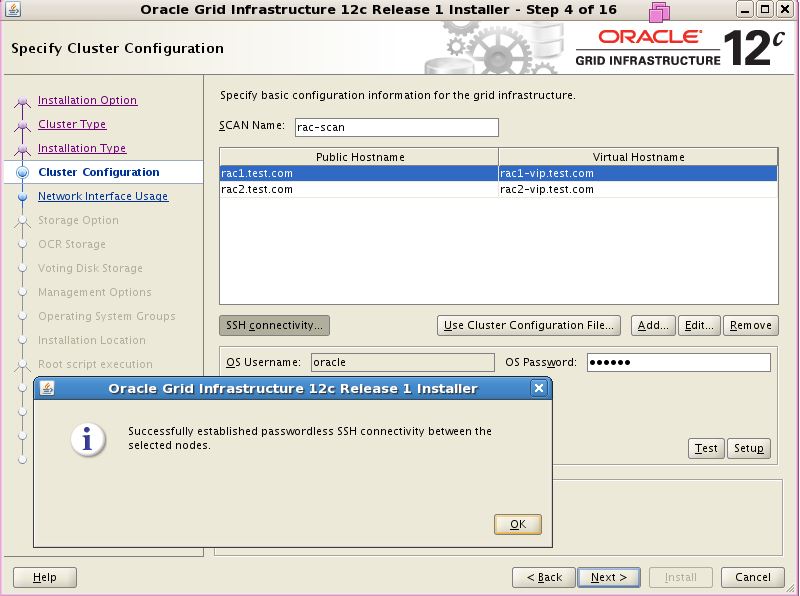
Start grid software installation as user oracle, remember to run command xhost+ as root.

Install package cvuqdisk-1.0.9-1.rpm from grid software as user root


Check Cluster status on Node 1 and Node 2

[root@rac1 ~]# crsctl stat res -t
--------------------------------------------------------------------------------
Name           Target  State        Server                   State details
--------------------------------------------------------------------------------
Local Resources
--------------------------------------------------------------------------------
ora.LISTENER.lsnr
               ONLINE  ONLINE       rac1                     STABLE
               ONLINE  ONLINE       rac2                     STABLE
ora.PROD.dg
               ONLINE  ONLINE       rac1                     STABLE
               ONLINE  ONLINE       rac2                     STABLE
ora.asm
               ONLINE  ONLINE       rac1                     Started,STABLE
               ONLINE  ONLINE       rac2                     Started,STABLE
ora.net1.network
               ONLINE  ONLINE       rac1                     STABLE
               ONLINE  ONLINE       rac2                     STABLE
ora.ons
               ONLINE  ONLINE       rac1                     STABLE
               ONLINE  ONLINE       rac2                     STABLE
--------------------------------------------------------------------------------
Cluster Resources
--------------------------------------------------------------------------------
ora.LISTENER_SCAN1.lsnr
      1        ONLINE  ONLINE       rac1                     STABLE
ora.LISTENER_SCAN2.lsnr
      1        ONLINE  ONLINE       rac1                     STABLE
ora.LISTENER_SCAN3.lsnr
      1        ONLINE  ONLINE       rac1                     STABLE
ora.MGMTLSNR
      1        OFFLINE OFFLINE                               STABLE
ora.cvu
      1        ONLINE  ONLINE       rac1                     STABLE
ora.oc4j
      1        ONLINE  ONLINE       rac1                     STABLE
ora.prod.db
      1        ONLINE  ONLINE       rac1                     Open,STABLE
      2        ONLINE  ONLINE       rac2                     Open,STABLE
ora.rac1.vip
      1        ONLINE  ONLINE       rac1                     STABLE
ora.rac2.vip
      1        ONLINE  ONLINE       rac2                     STABLE
ora.scan1.vip
      1        ONLINE  ONLINE       rac1                     STABLE
ora.scan2.vip
      1        ONLINE  ONLINE       rac1                     STABLE
ora.scan3.vip
      1        ONLINE  ONLINE       rac1                     STABLE

Install 12.1.0.2 oracle database:


[root@rac1 ~]#sqlplus "/as sysdba"

SQL*Plus: Release 12.1.0.2.0 Production on Sat Jul 18 17:40:30 2015

Copyright (c) 1982, 2014, Oracle.  All rights reserved.

Connected to:
Oracle Database 12c Enterprise Edition Release 12.1.0.2.0 - 64bit Production
With the Partitioning, Real Application Clusters, Automatic Storage Management, OLAP,
Advanced Analytics and Real Application Testing options

SQL> select INSTANCE_NUMBER,INSTANCE_NAME,HOST_NAME,VERSION from gv$instance;

INSTANCE_NUMBER INSTANCE_NAME    HOST_NAME            VERSION
--------------- ---------------- -------------------- -----------------
              1 prod1            rac1.test.com        12.1.0.2.0
              2 prod2            rac2.test.com        12.1.0.2.0