Showing posts with label Error. Show all posts

13 December 2017

Cannot identify any valid application tier nodes in ADOP_VALID_NODES table. Ensure AutoConfig has been run on all nodes

$ adop phase=apply patchtop=/web02/Patch/R122_Pre/APPS/R12.2.7 patches=25820806,25828573 hotpatch=yes merge=yes

Enter the APPS password:
Enter the SYSTEM password:
Enter the WLSADMIN password:

Validating credentials.

Initializing.
    Run Edition context  : /web03/TEST/fs1/inst/apps/TEST_epswdev/appl/admin/TEST_epswdev.xml
    Patch edition context: /web03/TEST/fs2/inst/apps/TEST_epswdev/appl/admin/TEST_epswdev.xml
*******FATAL ERROR*******
PROGRAM : (/web03/TEST/fs1/EBSapps/appl/ad/12.0.0/bin/adzdoptl.pl)
TIME    : Fri Dec 08 12:01:32 2017
FUNCTION: ADOP::GlobalVars::_GetMandatoryArgs [ Level 1 ]
ERRORMSG: Cannot identify any valid application tier nodes in
          ADOP_VALID_NODES table. Ensure AutoConfig has been run on all nodes.


[STATEMENT] Please run adopscanlog utility, using the command

"adopscanlog -latest=yes"

to get the list of the log files along with snippet of the error message corresponding to each log file.


adop exiting with status = 9 (Fail)

sqlplus apps/apps EXEC FND_CONC_CLONE.SETUP_CLEAN;
COMMIT;

Run autoconfig on DB and application node including Patch FS.

Restart the adop

adop phase=apply patchtop=/web02/Patch/R122_Pre/APPS/R12.2.7 patches=25820806,25828573 hotpatch=yes merge=yes restart=yes abandon=no

Still Issue Persist Folow Slution 2 below.

Solution 2:

select * from FND_OAM_CONTEXT_FILES;

select APPL_TOP_ID,NAME from ad_appl_tops;

select * from fnd_nodes

drop synonym apps.fnd_nodes;

create synonym apps.fnd_nodes for applsys.fnd_nodes;

drop synonym apps.fnd_oam_context_files;

create synonym apps.fnd_oam_context_files for applsys.fnd_oam_context_files;

Restart the adop

adop phase=apply patchtop=/web02/Patch/R122_Pre/APPS/R12.2.7 patches=25820806,25828573 hotpatch=yes merge=yes restart=yes abandon=no
[ERROR]: The values of s_current_base and s_other_base are not set correctly on both RUN and PATCH filesystems

adop phase=apply patchtop=$AU_TOP/patch/115 patches=driver:u10201000.drv options=nocopyportion,nogenerateportion,forceapply hotpatch=yes

When attempting to run adop phase=prepare, the following error occurs.

[ERROR]: JDK TOP (or FMW JDK TOP) is not set up correctly.
[WARNING]: There could be issues while validating the ports used for E-Business Suite instance against ports used in /etc/services. Refer the log file for more details.
[ERROR]: Some of the ports specified for the patch file system are not available.
[ERROR]: The value of s_file_edition is not set correctly in at least one of the context files
[ERROR]: The values of s_current_base and s_other_base are not set correctly on both RUN and PATCH filesystems

Solution:-

 Delete duplicate context files and run autoconfig to create new ones.

 1.backup FND_OAM_CONTEXT_FILES

 SQL>create table FND_OAM_CONTEXT_FILES_BK as select * from FND_OAM_CONTEXT_FILES;

 2.delete data from FND_OAM_CONTEXT_FILES table.

 SQL>delete from FND_OAM_CONTEXT_FILES;

 3.run autoconfig on all nodes including Patch FS.

 4.confirm the new data from FND_OAM_CONTEXT_FILES;

 SQL>select * from FND_OAM_CONTEXT_FILES;

 5.execute the adop again.

 Alternate solution2 :

 SQL> EXEC FND_CONC_CLONE.SETUP_CLEAN;

 SQL> Commit;

 run autoconfig on all nodes including Patch FS.

 confirm the new data from FND_OAM_CONTEXT_FILES;

 SQL>select * from FND_OAM_CONTEXT_FILES;

 execute the adop again.

java.lang.OutOfMemoryError: Java heap space during Weblogic patching

java.lang.OutOfMemoryError: Java heap space during Weblogic patching

$ bsu.sh -install -patch_download_dir=/web03/TEST/fs2/FMW_Home/utils/bsu/cache_dir -patchlist=FMJJ -prod_dir=/web03/TEST/fs2/FMW_Home/wlserver_10.3
JVMDUMP039I Processing dump event "systhrow", detail "java/lang/OutOfMemoryError" at 2017/12/08 15:53:57 - please wait.
JVMDUMP032I JVM requested System dump using '/web03/TEST/fs2/FMW_Home/utils/bsu/core.20171208.155357.40042682.0001.dmp' in response to an event
Note: "Enable full CORE dump" in smit is set to FALSE and as a result there will be limited threading information in core file.
JVMDUMP010I System dump written to /web03/TEST/fs2/FMW_Home/utils/bsu/core.20171208.155357.40042682.0001.dmp
JVMDUMP032I JVM requested Heap dump using '/web03/TEST/fs2/FMW_Home/utils/bsu/heapdump.20171208.155357.40042682.0002.phd' in response to an event
JVMDUMP010I Heap dump written to /web03/TEST/fs2/FMW_Home/utils/bsu/heapdump.20171208.155357.40042682.0002.phd
JVMDUMP032I JVM requested Heap dump using '/web03/TEST/fs2/FMW_Home/utils/bsu/heapdump.20171208.155357.40042682.0003.phd' in response to an event
JVMDUMP010I Heap dump written to /web03/TEST/fs2/FMW_Home/utils/bsu/heapdump.20171208.155357.40042682.0003.phd
JVMDUMP032I JVM requested Heap dump using '/web03/TEST/fs2/FMW_Home/utils/bsu/heapdump.20171208.155357.40042682.0004.phd' in response to an event
JVMDUMP010I Heap dump written to /web03/TEST/fs2/FMW_Home/utils/bsu/heapdump.20171208.155357.40042682.0004.phd
JVMDUMP032I JVM requested Java dump using '/web03/TEST/fs2/FMW_Home/utils/bsu/javacore.20171208.155357.40042682.0005.txt' in response to an event
JVMDUMP010I Java dump written to /web03/TEST/fs2/FMW_Home/utils/bsu/javacore.20171208.155357.40042682.0005.txt
JVMDUMP032I JVM requested Snap dump using '/web03/TEST/fs2/FMW_Home/utils/bsu/Snap.20171208.155357.40042682.0008.trc' in response to an event
JVMDUMP010I Snap dump written to /web03/TEST/fs2/FMW_Home/utils/bsu/Snap.20171208.155357.40042682.0008.trc
JVMDUMP013I Processed dump event "systhrow", detail "java/lang/OutOfMemoryError".
JVMDUMP032I JVM requested Java dump using '/web03/TEST/fs2/FMW_Home/utils/bsu/javacore.20171208.155357.40042682.0006.txt' in response to an event
JVMDUMP010I Java dump written to /web03/TEST/fs2/FMW_Home/utils/bsu/javacore.20171208.155357.40042682.0006.txt
JVMDUMP032I JVM requested Snap dump using '/web03/TEST/fs2/FMW_Home/utils/bsu/Snap.20171208.155357.40042682.0009.trc' in response to an event
JVMDUMP010I Snap dump written to {nothing to snap}
JVMDUMP013I Processed dump event "systhrow", detail "java/lang/OutOfMemoryError".
JVMDUMP032I JVM requested Java dump using '/web03/TEST/fs2/FMW_Home/utils/bsu/javacore.20171208.155357.40042682.0007.txt' in response to an event
JVMDUMP010I Java dump written to /web03/TEST/fs2/FMW_Home/utils/bsu/javacore.20171208.155357.40042682.0007.txt
JVMDUMP032I JVM requested Snap dump using '/web03/TEST/fs2/FMW_Home/utils/bsu/Snap.20171208.155357.40042682.0010.trc' in response to an event
JVMDUMP010I Snap dump written to /web03/TEST/fs2/FMW_Home/utils/bsu/Snap.20171208.155357.40042682.0010.trc
JVMDUMP013I Processed dump event "systhrow", detail "java/lang/OutOfMemoryError".
Exception in thread "main" Exception in thread "Timer-0" java.lang.OutOfMemoryErrorjava.lang.OutOfMemoryError: : Java heap spaceJava heap space

        at      at org.apache.xmlbeans.impl.schema.SchemaTypeImpljava.io.UnixFileSystem..getPropertiescanonicalize((SchemaTypeImpl.javaUnixFileSystem.java::710874))

        at      at com.bea.cie.common.dao.xbean.XBeanDataHandlerjava.io.File..loadPropertyMapgetCanonicalPath((XBeanDataHandler.javaFile.java::767350))

        at      at com.bea.cie.common.dao.xbean.XBeanDataHandlerjava.util.prefs.FileSystemPreferences..<init>lockFile((XBeanDataHandler.javaFileSystemPreferences.java::9991)4
)       at
com.bea.cie.common.dao.xbean.XBeanDataHandler   at .java.util.prefs.FileSystemPreferencescreateDataHandler.(syncXBeanDataHandler.java(:FileSystemPreferences.java5:5794)1
)       at
com.bea.cie.common.dao.xbean.XBeanDataHandler   at .java.util.prefs.FileSystemPreferencesgetComplexValue.(flushXBeanDataHandler.java(:FileSystemPreferences.java4:5853)6
)       at
com.bea.plateng.patch.dao.cat.PatchCatalogHelper        at .java.util.prefs.FileSystemPreferencesgetPatchDependencies.(syncWorldPatchCatalogHelper.java(:FileSystemPreferences.java4:4427)6
)       at
com.bea.plateng.patch.dao.cat.PatchCatalogHelper        at .java.util.prefs.FileSystemPreferencesgetPatchDependencies.(access$1200PatchCatalogHelper.java(:FileSystemPreferences.java4:6642))

        at      at com.bea.plateng.patch.dao.cat.PatchCatalogjava.util.prefs.FileSystemPreferences$3..getPatchDependenciesrun((PatchCatalog.javaFileSystemPreferences.java::5464)4
)
        at java.util.TimerThread        at com.bea.plateng.patch.dao.cat.PatchCatalogHelper.getInvalidatedPatchMap(PatchCatalogHelper.java:1621)
        at com.bea.plateng.patch.PatchSystem.updatePatchCatalog(PatchSystem.java:436)
        at com.bea.plateng.patch.PatchSystem.refresh(PatchSystem.java:130)
        at com.bea.plateng.patch.PatchSystem.setCacheDir(PatchSystem.java.:20mainLoop(Timer.java:1)
567     at com.bea.plateng.patch.Patch.main(Patch.java:281)
)
        at java.util.TimerThread.run(Timer.java:517)

Solution :

$ cat bsu.sh
#!/bin/sh

JAVA_HOME="/web03/TEST/fs2/EBSapps/comn/util/jdk64"

MEM_ARGS="-Xms512m -Xmx1024m -XX:+UseParallelGC"

"$JAVA_HOME/bin/java" ${MEM_ARGS} -jar patch-client.jar $*
$ vi bsu.sh  -- Set below Values

MEM_ARGS="-Xms2048m -Xmx2048m -XX:+UseParallelGC"

Resart the Patch

$ bsu.sh -install -patch_download_dir=/web03/TEST/fs2/FMW_Home/utils/bsu/cache_dir -patchlist=FMJJ -prod_dir=/web03/TEST/fs2/FMW_Home/wlserver_10.3
Checking for conflicts....

Weblogic 10.3.6 Patching Error Using BSU - "java.lang.OutOfMemoryError: Java heap space" (Doc ID 2291916.1)

ORA-39726: unsupported add/drop column operation on compressed tables

R12.2.0 to R12.2.7 adop failed with ORA-39726

ORA-39726: unsupported add/drop column operation on compressed tables   

select * from dba_tab_partitions where COMPRESSION='ENABLED';

12.1.0.2 Upgrade fails with ORA-39726: unsupported add/drop column operation on compressed tables (Doc ID 2279704.1)

select * from dba_tables where COMPRESSION='ENABLED';   


spool file uncompress_table.sql

SELECT 'alter table '||owner||'.'||TABLE_NAME||' nocompress '||';' sql_to_uncompress_table
FROM   dba_tables where COMPRESSION='ENABLED';

sqlplus apps/apps @uncompress_table.sql

spool file uncompress_partable.sql

SELECT 'alter table '||TABLE_OWNER||'.'||TABLE_NAME||' nocompress '||';' sql_to_uncompress_table
FROM   dba_tab_partitions where COMPRESSION='ENABLED';

sqlplus apps/apps @uncompress_partable.sql

Restart the adop session and check.

 Reference : 12.1.0.2 Upgrade fails with ORA-39726: unsupported add/drop column operation on compressed tables (Doc ID 2279704.1)

ORA-01400: cannot insert NULL into ("EGO"."EGO_ODI_WS_XSL_ZD"."ZD_EDITION_NAME")

R12.2.0 to R12.2.7 upgrade worker failed with ORA-01400

 sqlplus -s APPS/***** @/web03/TEST/fs1/EBSapps/appl/ad/12.0.0/patch/115/sql/adsqlwrapper.sql '/web03/TEST/fs1/EBSapps/appl/ego/12.0
.0/patch/115/sql/egoxslzd.sql &un_apps &un_ego'

PL/SQL procedure successfully completed.

DECLARE
*
ERROR at line 1:
ORA-01400: cannot insert NULL into
("EGO"."EGO_ODI_WS_XSL_ZD"."ZD_EDITION_NAME")
ORA-06512: at line 7

solution:

ALTER TABLE EGO.ego_odi_ws_xsl_zd  MODIFY ZD_EDITION_NAME varchar2(30 Byte) NULL;

restart the adop session

adop phase=apply apply_mode=downtime patches=24690690 restart=yes abandon=no

ERRORMSG: Adsplice action did not go through successfully.

ADOP prepare phase failed with below Error:

Reading language information from applUS.txt ...
  Temporarily resetting CLASSPATH to:
  "/web03/TEST/fs2/EBSapps/appl/ad/12.0.0/java/adjava.zip:/web03/TEST/fs2/EBSapps/comn/util/jdk32/lib/dt.jar:/web03/TEST/fs2/EBSapps/comn/util/jdk32/lib/tools.jar:/web03/TEST/fs2/EBSapps/comn/util/jdk32/jre/lib/rt.jar:/web03/TEST/fs2/EBSapps/comn/shared-libs/ebs-3rdparty/WEB-INF/lib/ebs3rdpartyManifest.jar:/web03/TEST/fs2/FMW_Home/Oracle_EBS-app1/shared-libs/ebs-fmw/WEB-INF/lib/ebsFMWManifest.jar:/web03/TEST/fs2/FMW_Home/Oracle_EBS-app1/shared-libs/ebs-appsborg/WEB-INF/lib/ebsAppsborgManifest.jar:/web03/TEST/fs2/FMW_Home/oracle_common/modules/oracle.uix_11.1.1/uix2.jar:/web03/TEST/fs2/EBSapps/comn/java/classes:/web03/TEST/fs2/EBSapps/10.1.2/forms/java:/web03/TEST/fs2/EBSapps/10.1.2/forms/java/frmall.jar:/web03/TEST/fs2/EBSapps/10.1.2/jlib/ewt3.jar:/web03/TEST/fs2/EBSapps/10.1.2/j2ee/OC4J_BI_Forms/applications/formsapp/formsweb/WEB-INF/lib/frmsrv.jar"

  Calling /web03/TEST/fs2/EBSapps/comn/util/jdk32/jre/bin/java ...
*******FATAL ERROR*******
PROGRAM : (/web03/TEST/fs1/EBSapps/appl/ad/12.0.0/patch/115/bin/txkADOPPreparePhaseSynchronize.pl)
TIME    : Mon Dec 11 15:03:31 2017
FUNCTION: main::execADSPLICE [ Level 1 ]
ERRORMSG: Adsplice action did not go through successfully.

    [UNEXPECTED]Error occurred running "perl /web03/TEST/fs1/EBSapps/appl/ad/12.0.0/patch/115/bin/txkADOPPreparePhaseSynchronize.pl -contextfile=/web03/TEST/fs1/inst/apps/TEST_epswdev/appl/admin/TEST_epswdev.xml -patchcontextfile=/web03/TEST/fs2/inst/apps/TEST_epswdev/appl/admin/TEST_epswdev.xml -promptmsg=hide -console=off -patchtop=/web03/TEST/fs_ne/EBSapps/patch -mode=update -sync_mode=patch -sessionid=10 -timestamp=20171211_142941 -workercount=16 -outdir=/web03/TEST/fs_ne/EBSapps/log/adop/10/20171211_142941/prepare/epswdev -autoskip=No"
    [UNEXPECTED]Error calling runSyncFS subroutine.
    Stopping services on patch file system.
    Stopping admin server.

You are running adadminsrvctl.sh version 120.10.12020000.10


 The AdminServer is already shutdown

AdminServer logs are located at /web03/TEST/fs2/FMW_Home/user_projects/domains/EBS_domain_TEST/servers/AdminServer/logs

adadminsrvctl.sh: exiting with status 2

adadminsrvctl.sh: check the logfile /web03/TEST/fs2/inst/apps/TEST_epswdev/logs/appl/admin/log/adadminsrvctl.txt for more information ...

    Stopping node manager.

You are running adnodemgrctl.sh version 120.11.12020000.12


The Node Manager is already shutdown

NodeManager log is located at /web03/TEST/fs2/FMW_Home/wlserver_10.3/common/nodemanager/nmHome1

adnodemgrctl.sh: exiting with status 2

adnodemgrctl.sh: check the logfile /web03/TEST/fs2/inst/apps/TEST_epswdev/logs/appl/admin/log/adnodemgrctl.txt for more information ...

    [ERROR]     Prepare phase has failed.


[STATEMENT] Please run adopscanlog utility, using the command

"adopscanlog -latest=yes"

to get the list of the log files along with snippet of the error message corresponding to each log file.


adop exiting with status = 1 (Fail)


=============================
Inside evalADPATCHStatus()...
=============================

message_status: ERROR
Adsplice action did not go through successfully.
*******FATAL ERROR*******
PROGRAM : (/web03/TEST/fs1/EBSapps/appl/ad/12.0.0/patch/115/bin/txkADOPPreparePhaseSynchronize.pl)
TIME    : Mon Dec 11 15:03:31 2017
FUNCTION: main::execADSPLICE [ Level 1 ]
ERRORMSG: Adsplice action did not go through successfully.

Solution:

select ORACLE_ID,ORACLE_USERNAME,ENABLED_FLAG from FND_ORACLE_USERID WHERE ORACLE_USERNAME ='XBOL';

ORACLE_ID ORACLE_USERNAME ENABLED_FLAG
20043           XBOL   

UPDATE FND_ORACLE_USERID SET ENABLED_FLAG = 'N' WHERE ORACLE_ID = 20043;

select ORACLE_ID,ORACLE_USERNAME,ENABLED_FLAG from FND_ORACLE_USERID WHERE ORACLE_USERNAME ='XBOL';

ORACLE_ID ORACLE_USERNAME ENABLED_FLAG
20043           XBOL              N

If issue still Persist follow below action plan.

Run adop phase=cleanup cleanup_mode=full
Run adop phase=fs_clone

Reference : Adop Prepare ERRORMSG: Adsplice Action Did Not Go Through Successfully After Add new Custom Application in R12.2 (Doc ID 1932207.1)

06 October 2017

REP-0004: Warning: Unable to open user preference file

All Concurrent request completed with below Error.

Error:

REP-0004: Warning: Unable to open user preference file.
REP-0069: Internal error
REP-57054: In-process job terminated:Finished successfully but output is voided

Solution :

I have Checked all necessary permission and access are given already.

Copy of the file prefs.ora in the directory  $ORACLE_HOME/tools/admin to $HOME

$ cp $ORACLE_HOME/tools/admin/prefs.ora $HOME/

Reference : 12: Request Logs Contain the Message "REP-0004: Warning: Unable to open user preference file" (Doc ID 1120529.1)

03 October 2017

ld: 0711-851 SEVERE ERROR: Output file: librw.so The file is in use and cannot be overwritten


Relink report executables failed with below error on AIX 6.1 X64
Error:

$ cd $ORACLE_HOME/reports/lib32
$ make -f ins_reports.mk install
        /web03/oratest/apps/tech_st/10.1.2/bin/mkexp.sh /web03/oratest/apps/tech_st/10.1.2/lib32//librwu.a  > librwuso.exp
        rm -f rwsutil.o rwspid.o ;  /bin/ar x /web03/oratest/apps/tech_st/10.1.2/lib32//librwu.a  rwsutil.o rwspid.o ;  (LD_OPTIONS="-zmultidefs";  ld -o /web03/oratest/apps/tech_st/10.1.2/lib32//librwu.so -bM:SRE -bnoentry -bnolibpath  -bE:librwuso.exp rwsutil.o rwspid.o  -lm -lc -lm  -ldl /web03/oratest/apps/tech_st/10.1.2/lib32/libclntsh.a -lpthreads  -L/usr/lpp/X11/lib/R6 -L/usr/lpp/X11/lib/R6/Motif2.1 -lXm -lXt -lX11 -lm `cat /web03/oratest/apps/tech_st/10.1.2/lib32/sysliblist` /web03/oratest/apps/tech_st/10.1.2/lib32/libclntst10.a )
        rm -f zrhitem.o zrhcursor.o;  /bin/ar x /web03/oratest/apps/tech_st/10.1.2/lib32//librw.a zrhitem.o zrhcursor.o
        /web03/oratest/apps/tech_st/10.1.2/bin/mkexp.sh /web03/oratest/apps/tech_st/10.1.2/lib32/libmmcm.a > temp1.exp
        /web03/oratest/apps/tech_st/10.1.2/bin/mkexp.sh /web03/oratest/apps/tech_st/10.1.2/lib32/librw.a > temp2.exp
        cat temp1.exp temp2.exp > temp.exp
        sort -u temp.exp > librw.exp
        rm temp1.exp temp2.exp temp.exp
ld: 0711-851 SEVERE ERROR: Output file: /web03/oratest/apps/tech_st/10.1.2/lib32//librw.so
        The file is in use and cannot be overwritten.
make: 1254-004 The error code from the last command is 12.

Stop.
$
Solution:
$ su - root
root's Password:
/etc/profile[61]: q:  not found.
# /usr/sbin/slibclean
# exit
$ cd $ORACLE_HOME/reports/lib32
$ make -f ins_reports.mk install
        /web03/oratest/apps/tech_st/10.1.2/bin/mkexp.sh /web03/oratest/apps/tech_st/10.1.2/lib32//librwu.a  > librwuso.exp
        rm -f rwsutil.o rwspid.o ;  /bin/ar x /web03/oratest/apps/tech_st/10.1.2/lib32//librwu.a  rwsutil.o rwspid.o ;  (LD_OPTIONS="-zmultidefs";  ld -o /web03/oratest/apps/tech_st/10.1.2/lib32//librwu.so -bM:SRE -bnoentry -bnolibpath  -bE:librwuso.exp rwsutil.o rwspid.o  -lm -lc -lm  -ldl /web03/oratest/apps/tech_st/10.1.2/lib32/libclntsh.a -lpthreads  -L/usr/lpp/X11/lib/R6 -L/usr/lpp/X11/lib/R6/Motif2.1 -lXm -lXt -lX11 -lm `cat /web03/oratest/apps/tech_st/10.1.2/lib32/sysliblist` /web03/oratest/apps/tech_st/10.1.2/lib32/libclntst10.a )
        rm -f zrhitem.o zrhcursor.o;  /bin/ar x /web03/oratest/apps/tech_st/10.1.2/lib32//librw.a zrhitem.o zrhcursor.o
        /web03/oratest/apps/tech_st/10.1.2/bin/mkexp.sh /web03/oratest/apps/tech_st/10.1.2/lib32/libmmcm.a > temp1.exp
        /web03/oratest/apps/tech_st/10.1.2/bin/mkexp.sh /web03/oratest/apps/tech_st/10.1.2/lib32/librw.a > temp2.exp
        cat temp1.exp temp2.exp > temp.exp
        sort -u temp.exp > librw.exp
        rm temp1.exp temp2.exp temp.exp
ld: 0711-224 WARNING: Duplicate symbol: .bcopy
ld: 0711-224 WARNING: Duplicate symbol: .memmove
ld: 0711-224 WARNING: Duplicate symbol: .lxsVldStr
ld: 0711-224 WARNING: Duplicate symbol: .kgesec4
ld: 0711-224 WARNING: Duplicate symbol: .kgesec3
ld: 0711-224 WARNING: Duplicate symbol: .kgesec2
ld: 0711-224 WARNING: Duplicate symbol: .kgesec1
ld: 0711-224 WARNING: Duplicate symbol: .kghalp
ld: 0711-224 WARNING: Duplicate symbol: .kglgob
ld: 0711-224 WARNING: Duplicate symbol: .kghgrw
ld: 0711-224 WARNING: Duplicate symbol: .kghalf
ld: 0711-224 WARNING: Duplicate symbol: .kghfrf
ld: 0711-224 WARNING: Duplicate symbol: .kghalo
ld: 0711-224 WARNING: Duplicate symbol: .kgesec0
ld: 0711-224 WARNING: Duplicate symbol: .kglgdn
ld: 0711-224 WARNING: Duplicate symbol: .kglhfr
ld: 0711-224 WARNING: Duplicate symbol: .kglhin
ld: 0711-224 WARNING: Duplicate symbol: .kglini
ld: 0711-224 WARNING: Duplicate symbol: .kglfls
ld: 0711-224 WARNING: Duplicate symbol: .kgldmc
ld: 0711-224 WARNING: Duplicate symbol: .kgldmp
ld: 0711-224 WARNING: Duplicate symbol: .kglaud

Reference : What are the steps needed to Clean up the Libraries during Relinking of Reports on AIX? (Doc ID 834577.1)

05 July 2017

BEGIN failed--compilation aborted at adcfgclone.pl line 27

Error:-

$ perl adcfgclone.pl dbTechStack
Can't locate strict.pm in @INC (@INC contains: ../lib/5.10.0/aix-thread-multi-64all ../lib/5.10.0 ../lib/site_perl/5.10.0/aix-thread-multi-64all ../lib/site_perl/5.10.0 ../lib/5.10.0/aix-thread-multi-64all ../lib/5.10.0 ../lib/site_perl .) at adcfgclone.pl line 27.
BEGIN failed--compilation aborted at adcfgclone.pl line 27.

Solution :

$ echo $PERL5LIB

$ export PERL5LIB=$ORACLE_HOME/perl/lib/5.10.0:$ORACLE_HOME/perl/lib/site_perl/5.10.0:$ORACLE_HOME/perl

$ perl adcfgclone.pl dbTechStack

                     Copyright (c) 2002 Oracle Corporation
                        Redwood Shores, California, USA

                        Oracle Applications Rapid Clone

                                 Version 12.0.0

                      adcfgclone Version 120.31.12010000.8

Enter the APPS password :

Running:
/web01/oratest/db/appsutil/clone/bin/../jre/bin/java -Xmx600M -cp /web01/oratest/db/appsutil/clone/jlib/java:/web01/oratest/db/appsutil/clone/jlib/xmlparserv2.jar:/web01/oratest/db/appsutil/clone/jlib/ojdbc5.jar oracle.apps.ad.context.CloneContext -e /web01/oratest/db/appsutil/clone/bin/../context/db/CTXORIG.xml -validate -pairsfile /tmp/adpairsfile_17498188.lst -stage /web01/oratest/db/appsutil/clone -dbTechStack 2> /tmp/adcfgclone_17498188.err; echo $? > /tmp/adcfgclone_17498188.res

Log file located at /web01/oratest/db/appsutil/clone/bin/CloneContext_0413104358.log

Provide the values required for creation of the new Database Context file.

Target System Hostname (virtual or normal) [dev] :

Target Instance is RAC (y/n) [n] :

Target System Database SID : TEST

Target System Base Directory : /web01/oratest

Target System utl_file_dir Directory List : /usr/tmp

Number of DATA_TOP's on the Target System [2] :

Target System DATA_TOP Directory 1 [/u12/oraprod/fmsproddata] : /web01/oratest/fmstestdata

Target System DATA_TOP Directory 2 [/u14/oraprod/fmsproddata] : /web03/oratest/fmstestdata

Target System RDBMS ORACLE_HOME Directory [/web01/oratest/db/tech_st/11.2.0] : /web01/oratest/db

Do you want to preserve the Display [PRDDB] (y/n)  : n

Target System Display [dev:0.0] :

Do you want the the target system to have the same port values as the source system (y/n) [y] ? : n

Target System Port Pool [0-99] : 5

Checking the port pool 5
done: Port Pool 5 is free
Report file located at /web01/oratest/db/appsutil/temp/portpool.lst
Complete port information available at /web01/oratest/db/appsutil/temp/portpool.lst

Backing up /web01/oratest/db/appsutil/FMSTEST_epswdev.xml to /web01/oratest/db/appsutil/FMSTEST_epswdev.xml.bak

Creating the new Database Context file from :
  /web01/oratest/db/appsutil/template/adxdbctx.tmp

The new database context file has been created :
  /web01/oratest/db/appsutil/FMSTEST_epswdev.xml

Log file located at /web01/oratest/db/appsutil/clone/bin/CloneContext_0413104358.log
Check Clone Context logfile /web01/oratest/db/appsutil/clone/bin/CloneContext_0413104358.log for details.

Running Rapid Clone with command:
perl /web01/oratest/db/appsutil/clone/bin/adclone.pl java=/web01/oratest/db/appsutil/clone/bin/../jre mode=apply stage=/web01/oratest/db/appsutil/clone component=dbTechStack method=CUSTOM dbctxtg=/web01/oratest/db/appsutil/FMSTEST_epswdev.xml showProgress contextValidated=true
Running:
perl /web01/oratest/db/appsutil/clone/bin/adclone.pl java=/web01/oratest/db/appsutil/clone/bin/../jre mode=apply stage=/web01/oratest/db/appsutil/clone component=dbTechStack method=CUSTOM dbctxt

PLS-00201: identifier 'AD_JAR.GET_JRIPASSWORDS' must be declared

AD code level : [B.3]

Error: Unable to execute statement <
Begin
ad_jar.get_jripasswords(:l_storepass, :l_keypass);
End;
> len = 63

AD Administration error:
ORA-06550: line 3, column 1:
PLS-00201: identifier 'AD_JAR.GET_JRIPASSWORDS' must be declared
ORA-06550: line 3, column 1:
PL/SQL: Statement ignored


AD Administration error:

Unable to get passwords from Vault

You should check the file
/u02/applgstR12/apps/apps_st/appl/admin/FMSGST/log/adadmin.log

for errors.

Solution:

The AD_JAR object not available in apps schema.

sqlplus apps/apps @$AD_TOP/patch/115/sql/ADJRIS.pls

sqlplus apps/apps @$AD_TOP/patch/115/sql/ADJRIB.pls

Run the below SQL to see whether objects are valid

select owner,object_type,status from dba_objects where object_name='AD_JAR';

rerun the adadmin again.

Reference: ADOP Fails With Error "PLS-00201: identifier 'AD_JAR.GET_JRIPASSWORDS' must be declared" (Doc ID 1610328.1)

*******FATAL ERROR*******

$ $FND_TOP/bin/txkrun.pl -script=CfgOC4JApp
*** ALL THE FOLLOWING FILES ARE REQUIRED FOR RESOLVING RUNTIME ERRORS
*** Log File = /u03/appltest/inst/apps/FMSTEST_fmdevap/logs/appl/rgf/TXK/txkCfgOC4JApp_Mon_Feb_27_16_16_15_2017.log
Program : /u03/appltest/apps/apps_st/appl/fnd/12.0.0/patch/115/bin/txkCfgOC4JApp.pl started @ Mon Feb 27 16:16:15 2017

*** Log File = /u03/appltest/inst/apps/FMSTEST_fmdevap/logs/appl/rgf/TXK/txkCfgOC4JApp_Mon_Feb_27_16_16_15_2017.log

Enter Application name for re-deployment ? forms
Enter Oc4j Instance  password for re-deployment ?
Run Autoconfig <Yes/No> ? No


*****************************************************
Required values for starting OC4J instance "forms":
====================================================
s_formsstatus = enabled
s_forms_nprocs = 1 (value should be greater than 0)


Existing values from the context file:
======================================
s_formsstatus = enabled
s_forms_nprocs = 1
----------------------------------------------

*** Values for context variables are VALID ***

----------------------------------------------

*****************************************************

Stopping all OPMN processes.
OPMN stopped.

Errors encountered running /u03/appltest/apps/apps_st/appl/fnd/12.0.0/patch/115/bin/txkCfgOC4JApp.pl

*******FATAL ERROR*******
PROGRAM : /u03/appltest/apps/apps_st/appl/fnd/12.0.0/patch/115/bin/txkCfgOC4JApp.pl(/u03/appltest/apps/apps_st/appl/fnd/12.0.0/bin/txkrun.pl)
TIME    : Mon Feb 27 16:16:38 2017
FUNCTION: TXK::Process::run [ Level 3 ]
MESSAGES:
Command error: <rc> = 32512, <command> = /u03/appltest/apps/tech_st/10.1.3/opmn/bin/opmnctl start


STACK TRACE
        TXK::Error::abort('TXK::Error','HASH(0x201147d8)') called at /u03/appltest/apps/apps_st/appl/au/12.0.0/perl/TXK/Common.pm line 299
        TXK::Common::doError('TXK::Process=HASH(0x20779f38)','Command error: <rc> = 32512, <command> = /u03/appltest/apps/t...','undef') called at /u03/appltest/apps/apps_st/appl/au/12.0.0/perl/TXK/Common.pm line 314
        TXK::Common::setError('TXK::Process=HASH(0x20779f38)','Command error: <rc> = 32512, <command> = /u03/appltest/apps/t...') called at /u03/appltest/apps/apps_st/appl/au/12.0.0/perl/TXK/Process.pm line 449
        TXK::Process::run('TXK::Process=HASH(0x20779f38)','HASH(0x20634294)') called at /u03/appltest/apps/apps_st/appl/fnd/12.0.0/patch/115/bin/txkCfgOC4JApp.pl line 1587
        TXK::RunScript::execOPMNControl('HASH(0x20b13dac)') called at /u03/appltest/apps/apps_st/appl/fnd/12.0.0/patch/115/bin/txkCfgOC4JApp.pl line 599
        require /u03/appltest/apps/apps_st/appl/fnd/12.0.0/patch/115/bin/txkCfgOC4JApp.pl called at /u03/appltest/apps/apps_st/appl/au/12.0.0/perl/TXK/RunScript.pm line 105
        TXK::RunScript::require('TXK::RunScript','/u03/appltest/apps/apps_st/appl/fnd/12.0.0/patch/115/bin/txkC...') called at /u03/appltest/apps/apps_st/appl/au/12.0.0/perl/TXK/Script.pm line 177
        eval {...} called at /u03/appltest/apps/apps_st/appl/au/12.0.0/perl/TXK/Script.pm line 177
        TXK::Script::run('TXK::Script=HASH(0x20bfec88)','/u03/appltest/inst/apps/FMSTEST_fmdevap/logs/appl/rgf/TXK','/u03/appltest/apps/apps_st/appl/fnd/12.0.0/patch/115/bin/txkC...') called at /u03/appltest/apps/apps_st/appl/fnd/12.0.0/bin/txkrun.pl line 174

       
Solution :

TXKRUN.PL Deploying a New Forms .EAR File Error with OPMNCTL Start (Doc ID 1295791.1)  -  Workaround 2

Unable to get passwords from Vault

Completed database cleanup for previous session.

Error: Unable to execute statement <
Begin
ad_jar.get_jripasswords(:l_storepass, :l_keypass);
End;
> len = 63

AD Administration error:
ORA-01031: insufficient privileges
ORA-06512: at "SYS.DBMS_SESSION", line 101
ORA-06512: at "APPS.AD_JAR", line 17
ORA-06512: at line 3


AD Administration error:

Unable to get passwords from Vault


You should check the file
/u02/applgstR12/apps/apps_st/appl/admin/FMSGST/log/adadmin.log

for errors.


Solution:

Run adgrants.sql

sqlplus sys "/as sysdba" @adgrants.sql APPS

31 March 2017

Relink of module "UMX_ENDECA_RBACMigration.sh" failed

Relink of module "UMX_ENDECA_RBACMigration.sh" failed

Error:

Relink of module "UMX_ENDECA_RBACAuto.sh" failed.
See error messages above (also recorded in log file) for possible
reasons for the failure.  Also, please check that the Unix userid
running adrelink has read, write, and execute permissions
on the directory /u03/appltest/apps/apps_st/appl/fnd/12.0.0/bin,
and that there is sufficient space remaining on the disk partition
containing your Oracle Applications installation.

Relink of module "UMX_ENDECA_RBACMigration.sh" failed.
See error messages above (also recorded in log file) for possible
reasons for the failure.  Also, please check that the Unix userid
running adrelink has read, write, and execute permissions
on the directory /u03/appltest/apps/apps_st/appl/fnd/12.0.0/bin,
and that there is sufficient space remaining on the disk partition
containing your Oracle Applications installation.

Cause: above files are missing.

$ ls $FND_TOP/bin/UMX_ENDECA_RBACAuto.sh
ls: 0653-341 The file /u03/appltest/apps/apps_st/appl/fnd/12.0.0/bin/UMX_ENDECA_RBACAuto.sh does not exist.
$ ls $FND_TOP/bin/UMX_ENDECA_RBACMigration.sh
ls: 0653-341 The file /u03/appltest/apps/apps_st/appl/fnd/12.0.0/bin/UMX_ENDECA_RBACMigration.sh does not exist.

Solution:

Apply Patch 17797381 on your test instance then execute relink.

$ ls $FND_TOP/bin/UMX_ENDECA_RBACAuto.sh
/u03/appltest/apps/apps_st/appl/fnd/12.0.0/bin/UMX_ENDECA_RBACAuto.sh
$ ls $FND_TOP/bin/UMX_ENDECA_RBACMigration.sh
/u03/appltest/apps/apps_st/appl/fnd/12.0.0/bin/UMX_ENDECA_RBACMigration.sh
$

Reference: Relink Fails On 12.1.3+ With "UMX_ENDECA_RBACMigration.sh" & "UMX_ENDECA_RBACAuto.sh" (Doc ID 1680871.1)

07 February 2017

Compile JSP in Oracle Application R12

1. Login with application unix user and source the environment

. <APPL_TOP>/APPS<@TWO_TASK>_<Hostname>.env

2. Unix based Plateforms

$ perl $FND_TOP/patch/115/bin/ojspCompile.pl --compile --flush -p 2
logfile set: /u03/appltest/inst/apps/$TWO_TASK_hostname/logs/appl/rgf/ojsp/ojspc_error.log
starting...(compiling all)
using 10i internal ojsp ver: 10
synchronizing dependency file:
  loading deplist...8096
  enumerating jsps...8096
  updating dependency...0
initializing compilation:
  eliminating children...6025 (-2071)
translating and compiling:
  translating jsps...6025/6025 in 3m2s
  compiling jsps...6025/6025 in 12m43s
Finished!

3. Restart the apache services.

$ cd $ADMIN_SCRIPTS_HOME
$ ./adopmnctl.sh stopall

You are running adopmnctl.sh version 120.6.12010000.5


adopmnctl.sh: exiting with status 0

adopmnctl.sh: check the logfile /u03/appltest/inst/apps/$TWO_TASK_hostname/logs/appl/admin/log/adopmnctl.txt for more information ...

$ ./adopmnctl.sh startall

You are running adopmnctl.sh version 120.6.12010000.5

Starting Apache...
Apache started successfully.


Starting OACORE oc4j...
OACORE oc4j started successfully.


Starting FORMS oc4j...
FORMS oc4j started successfully.


Starting OAFM oc4j...
OAFM oc4j started successfully.


adopmnctl.sh: exiting with status 0

adopmnctl.sh: check the logfile /u03/appltest/inst/apps/FMSTEST_fmdevap/logs/appl/admin/log/adopmnctl.txt for more information ...

$

27 January 2017

Unable to locate 'linkxlC' utility in path


$ adcfgclone.pl dbTechStack
                     Copyright (c) 2002 Oracle Corporation
                        Redwood Shores, California, USA
                        Oracle Applications Rapid Clone
                                 Version 12.0.0
                      adcfgclone Version 120.31.12010000.8
Enter the APPS password :
no linkxlC in /u01/oradev/fmsdevdb/11.2.0/appsutil/clone/bin/../jre/bin /usr/bin /etc /usr/sbin /usr/ucb /home/oradev/bin /usr/bin/X11 /sbin /u01/oradev/fmsdevdb/11.2.0/bin .
Checking for make...    found - /usr/bin/make
 Checking for ld...     found - /usr/bin/ld
 Checking for linkxlC...
 Unable to locate 'linkxlC' utility in path
 Checking for ar...     found - /usr/bin/ar
 Unable to locate all utilities with system path.
 PATH = /u01/oradev/fmsdevdb/11.2.0/appsutil/clone/bin/../jre/bin:/usr/bin:/etc:/usr/sbin:/usr/ucb:/home/oradev/bin:/usr/bin/X11:/sbin:/u01/oradev/fmsdevdb/11.2.0/bin:.

WARNING: Could not find all the required OS utilities in the $PATH. Please review the checks above
$

Solution :-

$ which linkxlC
/usr/vacpp/bin/linkxlC
$ export PATH=/usr/vacpp/bin:$PATH
$ adcfgclone.pl dbTechStack
                     Copyright (c) 2002 Oracle Corporation
                        Redwood Shores, California, USA
                        Oracle Applications Rapid Clone
                                 Version 12.0.0
                      adcfgclone Version 120.31.12010000.8
Enter the APPS password :
Running:
/u01/oradev/fmsdevdb/11.2.0/appsutil/clone/bin/../jre/bin/java -Xmx600M -cp /u01/oradev/fmsdevdb/11.2.0/appsutil/clone/jlib/java:/u01/oradev/fmsdevdb/11.2.0/appsutil/clone/jlib/xmlparserv2.jar:/u01/oradev/fmsdevdb/11.2.0/appsutil/clone/jlib/ojdbc5.jar oracle.apps.ad.context.CloneContext -e /u01/oradev/fmsdevdb/11.2.0/appsutil/clone/bin/../context/db/CTXORIG.xml -validate -pairsfile /tmp/adpairsfile_44171378.lst -stage /u01/oradev/fmsdevdb/11.2.0/appsutil/clone -dbTechStack 2> /tmp/adcfgclone_44171378.err; echo $? > /tmp/adcfgclone_44171378.res
Log file located at /u01/oradev/fmsdevdb/11.2.0/appsutil/clone/bin/CloneContext_0127105900.log
Provide the values required for creation of the new Database Context file.
Target System Hostname (virtual or normal) [fmdevdb] :
 

26 January 2017

REP-50125: Caught exception: java.lang.reflect.InvocationTargetException

When submitting concurrent requests they run for a very long time will not compete You are forced to kill the request.

Error: -

$ rwdiag.sh -findAll
Environment:Environment java.lang.UnsatisfiedLinkError: Can't find library rwu  (librwu.a or .so) in sun.boot.library.path or java.library.path
sun.boot.library.path=/u02/applgstR12/apps/tech_st/10.1.2/jdk/jre/bin
java.library.path=/u02/applgstR12/apps/tech_st/10.1.2/jdk/bin:/u02/applgstR12/apps/tech_st/10.1.2/jdk/jre/bin/classic:/u02/applgstR12/apps/tech_st/10.1.2/jdk/jre/bin:/u02/applgstR12/apps/tech_st/10.1.2/jdk/jre/bin:/u02/applgstR12/apps/tech_st/10.1.2/jdk/jre/bin/classic:/u02/applgstR12/apps/tech_st/10.1.2/lib32:/u02/applgstR12/apps/tech_st/10.1.2/lib:/usr/dt/lib:/u02/applgstR12/apps/tech_st/10.1.2/jdk/jre/bin:/u02/applgstR12/apps/tech_st/10.1.2/jdk/jre/bin/classic:/u02/applgstR12/apps/apps_st/appl/cz/12.0.0/bin:/u02/applgstR12/apps/tech_st/10.1.2/lib32:/u02/applgstR12/apps/tech_st/10.1.2/lib:/usr/dt/lib:/u02/applgstR12/apps/tech_st/10.1.2/jdk/jre/bin:/u02/applgstR12/apps/tech_st/10.1.2/jdk/jre/bin/classic:/u02/applgstR12/apps/apps_st/appl/sht/12.0.0/lib:/u02/applgstR12/apps/tech_st/10.1.2/jdk/jre/lib/ppc:/u02/applgstR12/apps/tech_st/10.1.2/jdk/jre/bin/sovvm:/usr/lib
Environment:getEnvironmentStrings java.lang.UnsatisfiedLinkError: Can't find library rwu  (librwu.a or .so) in sun.boot.library.path or java.library.path
sun.boot.library.path=/u02/applgstR12/apps/tech_st/10.1.2/jdk/jre/bin
java.library.path=/u02/applgstR12/apps/tech_st/10.1.2/jdk/bin:/u02/applgstR12/apps/tech_st/10.1.2/jdk/jre/bin/classic:/u02/applgstR12/apps/tech_st/10.1.2/jdk/jre/bin:/u02/applgstR12/apps/tech_st/10.1.2/jdk/jre/bin:/u02/applgstR12/apps/tech_st/10.1.2/jdk/jre/bin/classic:/u02/applgstR12/apps/tech_st/10.1.2/lib32:/u02/applgstR12/apps/tech_st/10.1.2/lib:/usr/dt/lib:/u02/applgstR12/apps/tech_st/10.1.2/jdk/jre/bin:/u02/applgstR12/apps/tech_st/10.1.2/jdk/jre/bin/classic:/u02/applgstR12/apps/apps_st/appl/cz/12.0.0/bin:/u02/applgstR12/apps/tech_st/10.1.2/lib32:/u02/applgstR12/apps/tech_st/10.1.2/lib:/usr/dt/lib:/u02/applgstR12/apps/tech_st/10.1.2/jdk/jre/bin:/u02/applgstR12/apps/tech_st/10.1.2/jdk/jre/bin/classic:/u02/applgstR12/apps/apps_st/appl/sht/12.0.0/lib:/u02/applgstR12/apps/tech_st/10.1.2/jdk/jre/lib/ppc:/u02/applgstR12/apps/tech_st/10.1.2/jdk/jre/bin/sovvm:/usr/lib
java.lang.reflect.InvocationTargetException
oracle.reports.RWException: IDL:oracle/reports/RWException:1.0

Broadcast mechanism used to locate servers
------------------------------------------
Channel address = 228.5.6.7
Channel port    = 14021

REP-50503 No server found in the network

$ rwrun help=yes
JVMCI200 - ERROR: User register saving is not enabled, Garbage Collection could be incorrect.
JVMCI200 - ERROR: because of this the JVM library is explicitly aborting the process
JVMCI200 - ERROR: You must either rebuild the executable using "-bM:UR"
JVMCI200 - ERROR: or run with "export LDR_CNTRL=USERREGS"
IOT/Abort trap(coredump)

$ $INST_TOP/ora/10.1.2/bin/appsrwrun.sh userid=apps/apps mode=character report=$FND_TOP/reports/US/FNDSCURS.rdf batch=yes destype=file desname=./ddr2.out desformat=$FND_TOP/reports/HPL pagesize=132x66 traceopts=trace_all tracefile=ddr2.trc tracemode=trace_replace
Environment:Environment java.lang.UnsatisfiedLinkError: Can't find library rwu  (librwu.a or .so) in sun.boot.library.path or java.library.path
sun.boot.library.path=/u02/applgstR12/apps/tech_st/10.1.2/jdk/jre/bin
java.library.path=/u02/applgstR12/apps/tech_st/10.1.2/jdk/jre/bin:/u02/applgstR12/apps/tech_st/10.1.2/jdk/jre/bin/classic:/u02/applgstR12/apps/tech_st/10.1.2/lib32:/u02/applgstR12/apps/tech_st/10.1.2/lib:/usr/dt/lib:/u02/applgstR12/apps/tech_st/10.1.2/jdk/jre/bin:/u02/applgstR12/apps/tech_st/10.1.2/jdk/jre/bin/classic:/u02/applgstR12/apps/apps_st/appl/cz/12.0.0/bin:/u02/applgstR12/apps/tech_st/10.1.2/lib32:/u02/applgstR12/apps/tech_st/10.1.2/lib:/usr/dt/lib:/u02/applgstR12/apps/tech_st/10.1.2/jdk/jre/bin:/u02/applgstR12/apps/tech_st/10.1.2/jdk/jre/bin/classic:/u02/applgstR12/apps/apps_st/appl/sht/12.0.0/lib:/u02/applgstR12/apps/tech_st/10.1.2/jdk/jre/lib/ppc:/u02/applgstR12/apps/tech_st/10.1.2/jdk/jre/bin/sovvm:/usr/lib
Environment:getEnvironmentStrings java.lang.UnsatisfiedLinkError: Can't find library rwu  (librwu.a or .so) in sun.boot.library.path or java.library.path
sun.boot.library.path=/u02/applgstR12/apps/tech_st/10.1.2/jdk/jre/bin
java.library.path=/u02/applgstR12/apps/tech_st/10.1.2/jdk/jre/bin:/u02/applgstR12/apps/tech_st/10.1.2/jdk/jre/bin/classic:/u02/applgstR12/apps/tech_st/10.1.2/lib32:/u02/applgstR12/apps/tech_st/10.1.2/lib:/usr/dt/lib:/u02/applgstR12/apps/tech_st/10.1.2/jdk/jre/bin:/u02/applgstR12/apps/tech_st/10.1.2/jdk/jre/bin/classic:/u02/applgstR12/apps/apps_st/appl/cz/12.0.0/bin:/u02/applgstR12/apps/tech_st/10.1.2/lib32:/u02/applgstR12/apps/tech_st/10.1.2/lib:/usr/dt/lib:/u02/applgstR12/apps/tech_st/10.1.2/jdk/jre/bin:/u02/applgstR12/apps/tech_st/10.1.2/jdk/jre/bin/classic:/u02/applgstR12/apps/apps_st/appl/sht/12.0.0/lib:/u02/applgstR12/apps/tech_st/10.1.2/jdk/jre/lib/ppc:/u02/applgstR12/apps/tech_st/10.1.2/jdk/jre/bin/sovvm:/usr/lib
REP-50125: Caught exception: java.lang.reflect.InvocationTargetException


Solution :

1. Take a backup and remove rwnetwork.conf from $ORACLE_HOME/reports/conf

  $ mv rwnetwork.conf rwnetwork.conf_orig

 2. Stop/restart Applications tier.

 3. You need to ensure rwnetwork.conf is created on its own. As rwnetwork.conf is removed , the system should generate new file automatically after the reports are run.

 4.Reproduce the issue and check the following commands work fine to ensure the issue is resolved.
 a) rwdiag.sh -findAll
 b) rwrun help=yes
 c) $INST_TOP/ora/10.1.2/bin/appsrwrun.sh userid=apps/apps mode=character report=$FND_TOP/reports/US/FNDSCURS.rdf batch=yes destype=file   desname=./ddr2.out desformat=$FND_TOP/reports/HPL pagesize=132x66 traceopts=trace_all tracefile=ddr2.trc tracemode=trace_replace

 5.Run the Concurrent Request

Reference : Concurrent Processing - R12 Concurrent Requests Run Forever, rwrun Errors with REP-50125 (Doc ID 737445.1)

If not resolved Follow below steps.

2. Relink the reports executables:

cd $ORACLE_HOME/reports/lib32
make -f ins_reports.mk install

Reference : Concurrent Reports UnsatisfiedLinkError (Doc ID 849369.1)

24 January 2017

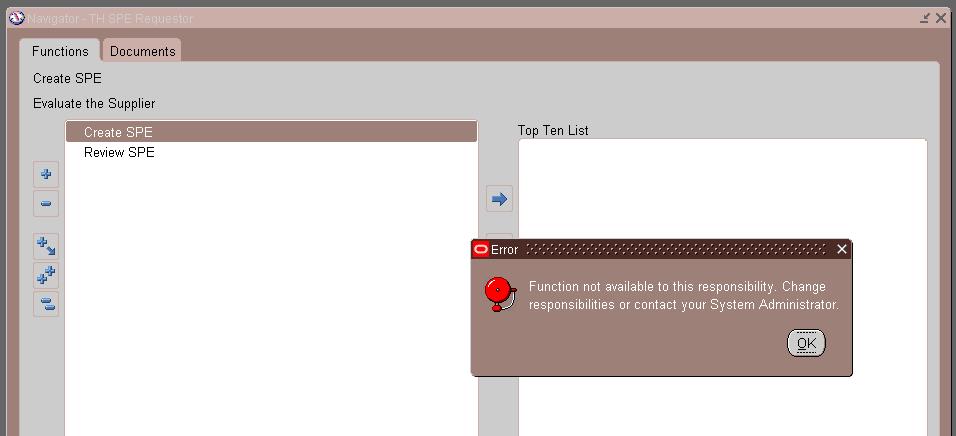
R12 Error 'Function not available to this responsibility' When Trying to Access Custom Form

R12 Error 'Function not available to this responsibility' When Trying to Access Custom Form


The issue is caused by the following setup:

Missing entry for CUSTOM_TOP under default.env file

Ideally in such cases,CUSTOM_TOP should be defined under default.env in $INST_TOP/ora/10.1.2/forms/server directory to have your custom form work with R12.

Solution:-

To implement the solution, please execute the following steps:

1. Login to server with APPLMGR manager user access.

2. Go to $INST_TOP/ora/10.1.2/forms/server directory.

3. Ensure that your CUSTOM_TOP 's are registered in the default.env file.

This means that, you should create an entry for environment variable CUSTOM_TOP (which contains physical path to your custom directory) like below in default.env file present under location $INST_TOP/ora/10.1.2/forms/server directory.

For Example:
.....

APPL_TOP=/home/applmgr/PROD/apps/apps_st/appl
CUSTOM_TOP=/home/applmgr/PROD/apps/apps_st/custom

4. Restart the middle tier services.

5. Retest the issue.


Reference : R12 Error 'Function not available to this responsibility' When Trying to Access Custom Form. (Doc ID 553014.1)

31 August 2015

DRG-10595: ALTER INDEX JTF_AMV_ITEMS_URL_CTX failed

R12.2.0 upgrade from R12.1.1 auto config failed with DRG-10595: ALTER INDEX JTF_AMV_ITEMS_URL_CTX failed

[applmgr@r1224 scripts]$ ./adautocfg.sh
Enter the APPS user password:

The log file for this session is located at: /apps/fs1/inst/apps/PROD_r1224/admin/log/08312036/adconfig.log

AutoConfig is configuring the Applications environment...

AutoConfig will consider the custom templates if present.
        Using CONFIG_HOME location     : /apps/fs1/inst/apps/PROD_r1224
        Classpath                   : /apps/fs1/FMW_Home/Oracle_EBS-app1/shared-libs/ebs-appsborg/WEB-INF/lib/ebsAppsborgManifest.jar:/apps/fs1/EBSapps/comn/java/classes

        Using Context file          : /apps/fs1/inst/apps/PROD_r1224/appl/admin/PROD_r1224.xml

Context Value Management will now update the Context file

        Updating Context file...COMPLETED

        Attempting upload of Context file and templates to database...COMPLETED

Configuring templates from all of the product tops...
        Configuring AD_TOP........COMPLETED
        Configuring FND_TOP.......COMPLETED
        Configuring ICX_TOP.......COMPLETED
        Configuring MSC_TOP.......COMPLETED
        Configuring IEO_TOP.......COMPLETED
        Configuring BIS_TOP.......COMPLETED
        Configuring CZ_TOP........COMPLETED
        Configuring AMS_TOP.......COMPLETED
        Configuring CCT_TOP.......COMPLETED
        Configuring WSH_TOP.......COMPLETED
        Configuring CLN_TOP.......COMPLETED
        Configuring OKE_TOP.......COMPLETED
        Configuring OKL_TOP.......COMPLETED
        Configuring OKS_TOP.......COMPLETED
        Configuring CSF_TOP.......COMPLETED
        Configuring IBY_TOP.......COMPLETED
        Configuring JTF_TOP.......COMPLETED
        Configuring MWA_TOP.......COMPLETED
        Configuring CN_TOP........COMPLETED
        Configuring CSI_TOP.......COMPLETED
        Configuring WIP_TOP.......COMPLETED
        Configuring CSE_TOP.......COMPLETED
        Configuring EAM_TOP.......COMPLETED
        Configuring FTE_TOP.......COMPLETED
        Configuring ONT_TOP.......COMPLETED
        Configuring AR_TOP........COMPLETED
        Configuring AHL_TOP.......COMPLETED
        Configuring IES_TOP.......COMPLETED
        Configuring OZF_TOP.......COMPLETED
        Configuring CSD_TOP.......COMPLETED
        Configuring IGC_TOP.......COMPLETED

AutoConfig completed with errors.
[applmgr@r1224 scripts]$


Error :

Executing script in InstantiateFile:
/apps/fs1/inst/apps/PROD_r1224/admin/install/jtfictx.sh
script returned:
****************************************************

jtfictx.sh started at Mon Aug 31 20:37:00 IST 2015


SQL*Plus: Release 10.1.0.5.0 - Production on Mon Aug 31 20:37:00 2015

Copyright (c) 1982, 2005, Oracle.  All rights reserved.

Enter value for 1: Enter value for 2: Enter value for 3: Connected.
DECLARE
*
ERROR at line 1:
ORA-29874: warning in the execution of ODCIINDEXALTER routine
ORA-29960: line 1,
DRG-10595: ALTER INDEX JTF_AMV_ITEMS_URL_CTX failed
DRG-11000: invalid keyword SYNC
ORA-06512: at "SYS.DBMS_SQL", line 1120
ORA-06512: at line 96


Disconnected from Oracle Database 12c Enterprise Edition Release 12.1.0.2.0 - 64bit Production

Solution :-

apply p19587162_R12.JTA.C_R12_GENERIC.zip

[applmgr@r1224 scripts]$ ./adautocfg.sh
Enter the APPS user password:

The log file for this session is located at: /apps/fs1/inst/apps/PROD_r1224/admin/log/08312102/adconfig.log

AutoConfig is configuring the Applications environment...

AutoConfig will consider the custom templates if present.
        Using CONFIG_HOME location     : /apps/fs1/inst/apps/PROD_r1224
        Classpath                   : /apps/fs1/FMW_Home/Oracle_EBS-app1/shared-libs/ebs-appsborg/WEB-INF/lib/ebsAppsborgManifest.jar:/apps/fs1/EBSapps/comn/java/classes

        Using Context file          : /apps/fs1/inst/apps/PROD_r1224/appl/admin/PROD_r1224.xml

Context Value Management will now update the Context file

        Updating Context file...COMPLETED

        Attempting upload of Context file and templates to database...COMPLETED

Configuring templates from all of the product tops...
        Configuring AD_TOP........COMPLETED
        Configuring FND_TOP.......COMPLETED
        Configuring ICX_TOP.......COMPLETED
        Configuring MSC_TOP.......COMPLETED
        Configuring IEO_TOP.......COMPLETED
        Configuring BIS_TOP.......COMPLETED
        Configuring CZ_TOP........COMPLETED
        Configuring AMS_TOP.......COMPLETED
        Configuring CCT_TOP.......COMPLETED
        Configuring WSH_TOP.......COMPLETED
        Configuring CLN_TOP.......COMPLETED
        Configuring OKE_TOP.......COMPLETED
        Configuring OKL_TOP.......COMPLETED
        Configuring OKS_TOP.......COMPLETED
        Configuring CSF_TOP.......COMPLETED
        Configuring IBY_TOP.......COMPLETED
        Configuring JTF_TOP.......COMPLETED
        Configuring MWA_TOP.......COMPLETED
        Configuring CN_TOP........COMPLETED
        Configuring CSI_TOP.......COMPLETED
        Configuring WIP_TOP.......COMPLETED
        Configuring CSE_TOP.......COMPLETED
        Configuring EAM_TOP.......COMPLETED
        Configuring FTE_TOP.......COMPLETED
        Configuring ONT_TOP.......COMPLETED
        Configuring AR_TOP........COMPLETED
        Configuring AHL_TOP.......COMPLETED
        Configuring IES_TOP.......COMPLETED
        Configuring OZF_TOP.......COMPLETED
        Configuring CSD_TOP.......COMPLETED
        Configuring IGC_TOP.......COMPLETED

AutoConfig completed successfully.
[applmgr@r1224 scripts]$

26 August 2015

ORA-28040: No matching authentication protocol

R12.2.0 Upgrade with 12.1.0.2 Database rapidwiz failed


Existing DB SID validation
Existing DB SID validation has failed.
Connection to database failed.  Unable to validate the current SID

DB Version Check
DB Version Check has failed.
Not able to check the Database version. Please make sure the Database is at 11.2.0.3 or higher

Unable to connect to the database as system, incorrect password   RW-40000: Warning: Unable to establish a Database connection. Please make sure the database is up before continuing with this install. Connection string used - jdbc:oracle:thin:@r1224.muthu.com:1526:PROD

DB service_names Check
DB service_names Check has failed.
Not able to check if ebs_patch as an entry exists in Database service_names parameter.


Log file Error:


ORA-28040: No matching authentication protocol


Solution :

Set SQLNET.ALLOWED_LOGON_VERSION=8 in the oracle/network/admin/sqlnet.ora file.

Restart your database.